
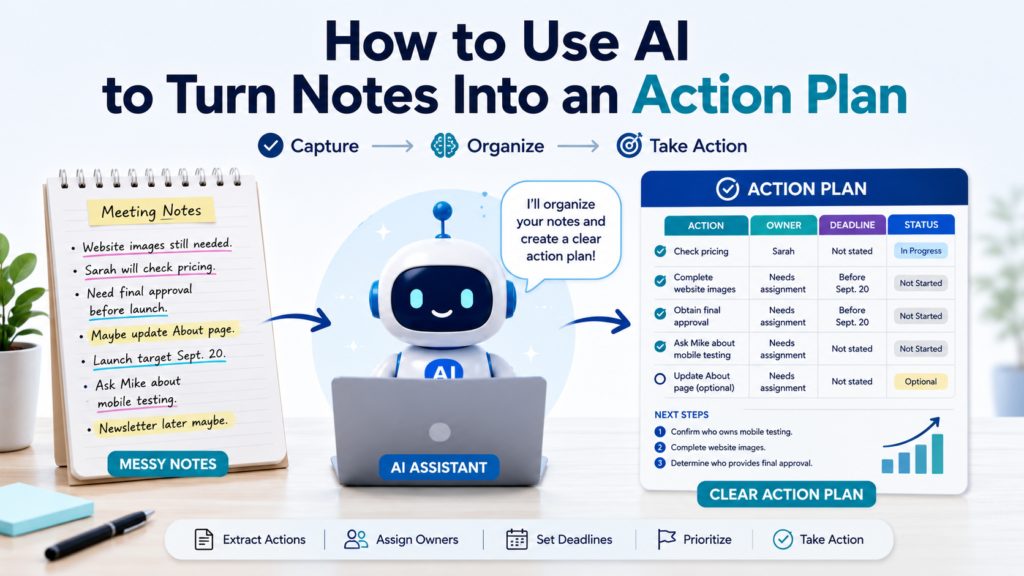
Notes are useful for capturing information, but notes alone do not always lead to action.
After a meeting, brainstorming session, class, research session, or personal planning session, you may have pages of ideas, decisions, reminders, questions, and unfinished thoughts. The information is there, but the next steps may still be unclear.
Learning how to use AI to turn notes into an action plan can help bridge that gap.
AI can review your notes, identify actual commitments, separate decisions from ideas, turn vague statements into clearer tasks, organize priorities, identify owners and deadlines that are already mentioned, and highlight information that still needs confirmation.
The important rule is simple: AI should organize what your notes actually say—not quietly invent missing responsibilities, dates, or decisions.
Why Use AI to Turn Notes Into an Action Plan?
Notes and action plans serve different purposes.
Notes capture what happened or what you were thinking. An action plan focuses on what needs to happen next.
| Notes May Contain | Action Plan Should Identify |
|---|---|
| Ideas | Actions worth taking |
| Discussion points | Decisions and next steps |
| Decisions | Tasks created by those decisions |
| Names | Confirmed owners |
| Dates | Actual deadlines |
| Questions | Items needing clarification |
| Problems | Actions or decisions needed |
| Suggestions | Optional ideas |
AI is particularly useful when these pieces are mixed together.
The goal is not to convert every sentence into a task. Some notes are simply context, observations, or ideas.
Step 1: Give AI the Original Notes
Start with the notes themselves rather than trying to clean everything up first.
Your notes might look like this:
Website images still needed.
Sarah will check pricing.
Need final approval before launch.
Maybe update About page.
Launch target Sept. 20.
Ask Mike about mobile testing.
New homepage design looks good.
Need another discussion about newsletter.
There are several different types of information here.
Some statements describe work. Some describe decisions. Some are observations. Others are uncertain.
Before asking AI to create an action plan, tell it not to fill in missing information.
Sample Prompt:
Review the notes below. Do not create an action plan yet. First identify:
- Confirmed decisions
- Clear action items
- Possible or optional actions
- Questions or unresolved issues
- Names, dates, and deadlines explicitly mentioned
- General information that does not require action
Do not infer an owner or deadline unless the notes explicitly provide one.
This first pass reduces the chance that AI will treat every line as a confirmed task.
Step 2: Separate Information From Action
One of the most important skills is recognizing the difference between information and something that requires action.
Consider:
New homepage design looks good.
That may simply be an observation.
Compare it with:
Sarah will send final homepage design to the developer.
That contains a clear action.
Or:
Maybe update About page.
That suggests a possible action, but it does not confirm that the update should happen.
Ask AI:
Classify each note as Information, Decision, Action, Question, or Optional Idea. If the category is unclear, label it Needs Clarification.
The result might look like:
| Note | Classification |
|---|---|
| Website images still needed | Action/Issue |
| Sarah will check pricing | Action |
| Need final approval before launch | Action/Requirement |
| Maybe update About page | Optional Idea |
| Launch target Sept. 20 | Date/Information |
| Ask Mike about mobile testing | Action |
| New homepage design looks good | Information |
This classification creates a cleaner foundation for the action plan.
Step 3: Identify Decisions That Have Already Been Made
Meeting and planning notes often contain decisions mixed with discussion.
For example:
We looked at three designs. Everyone preferred B. Use B for the final version.
The useful information is not the entire discussion.
The decision is:
Use Design B for the final version.
Ask:
Extract only decisions that appear to have been made in these notes. For each decision, show the exact note that supports it. Put suggestions and unresolved discussions in a separate section.
This is useful because completed decisions should not keep returning to your action list as open questions.
It also helps prevent AI from turning a suggestion into a decision.
Step 4: Turn Clear Commitments Into Actionable Tasks
Once you know which notes actually require action, turn them into clear tasks.
Vague note:
Pricing — Sarah.
Better task:
Check pricing.
Owner:
Sarah.
A useful task should normally begin with an action verb:
- Review
- Send
- Confirm
- Compare
- Schedule
- Update
- Draft
- Purchase
- Contact
- Test
- Approve
Asana’s task guidance similarly recommends clear, action-oriented task names and describes tasks in terms of the work to be done, the responsible person, and the due date.
Sample Prompt:
Convert only the confirmed action items into specific tasks. Begin each task with an action verb. Preserve the original meaning. Do not invent additional work.
The goal is to make vague notes easier to act on without expanding their meaning.
Step 5: Preserve Owners That Are Actually Mentioned
If your notes say:
Sarah will check pricing.
then assigning Sarah is reasonable.
But if the note says:
Need final approval before launch.
you do not know who is responsible.
Do not let AI quietly choose someone.
Ask:
Add an Owner column. Use a person’s name only when the notes clearly assign that person to the action. Otherwise write “Needs assignment.”
For example:
| Action | Owner |
|---|---|
| Check pricing | Sarah |
| Obtain final approval | Needs assignment |
| Ask Mike about mobile testing | Needs assignment |
| Decide whether to update About page | Needs assignment |
Notice that Ask Mike does not necessarily mean Mike owns the task. Someone else may be responsible for contacting him.
That distinction matters.
Step 6: Preserve Real Deadlines Without Inventing Them
Dates require the same discipline.
Suppose the notes say:
Final approval needed before Sept. 20 launch.
AI can identify a relationship between approval and the launch, but it should not invent:
Final approval due Sept. 18.
Unless Sept. 18 actually appears in your notes, that date is an estimate.
Use a prompt such as:
Extract confirmed deadlines exactly as written. If a task must happen before another event but no specific date is provided, describe the dependency instead of creating a date. Write “Not stated” when no deadline is available.
The resulting plan might say:
| Action | Deadline |
|---|---|
| Check pricing | Not stated |
| Obtain final approval | Before launch |
| Confirm launch | Sept. 20 target |
| Ask about mobile testing | Not stated |
This keeps the action plan honest.
Step 7: Identify Dependencies
Some actions cannot begin until something else happens.
For example:
Complete images → Obtain approval → Launch website
AI can help identify these relationships.
Sample Prompt:
Review these action items for dependencies explicitly stated or clearly required by the notes. Show which task must happen first. If a dependency is uncertain, label it “Possible dependency” instead of presenting it as a fact.
A simple structure works well:
| Action | Depends On |
|---|---|
| Complete website images | None stated |
| Obtain final approval | Required work completed |
| Launch website | Final approval |
| Update About page | No confirmed dependency |
Dependencies help determine what should happen first.
Step 8: Separate Confirmed Tasks From Optional Ideas
This is particularly important after brainstorming.
Notes may contain:
Maybe add video.
Consider newsletter.
Could redesign footer.
Need mobile testing before launch.
Only the final statement clearly describes required work.
If AI turns every idea into a task, your action plan becomes unnecessarily large.
Ask:
Separate the notes into Confirmed Actions and Optional Ideas. Do not move an optional idea into the action plan unless the notes indicate that a decision was made to pursue it.
You can keep optional ideas in a separate section for later review.
This helps prevent scope creep—the gradual addition of work that was never actually approved.
Step 9: Identify Questions That Block Action
Some notes cannot become tasks until you have more information.
Examples:
Which vendor should we use?
Is the budget approved?
Do we need legal review?
Who owns mobile testing?
These are not necessarily tasks to execute immediately. They may be unresolved questions.
Ask:
Identify questions or missing decisions that prevent an action item from moving forward. Create a Needs Clarification section.
For example:
Needs Clarification
- Who owns mobile testing?
- Has the budget been approved?
- Is the About page update required?
- Who gives final launch approval?
Now uncertainty is visible instead of being hidden inside the plan.
Step 10: Prioritize the Actions
Once the actions are clear, decide what deserves attention first.
Do not simply ask:
Prioritize these.
AI needs criteria.
Instead:
Prioritize these action items based on confirmed deadlines, dependencies, and whether another task is blocked by them. Do not assume that a task is important simply because it sounds important.
A practical structure is:
| Priority | Meaning |
|---|---|
| High | Deadline approaching or blocking other work |
| Medium | Important but not immediately blocking progress |
| Low | Can reasonably wait |
| Needs Clarification | Cannot prioritize confidently yet |
You can also ask AI to explain why it assigned each priority.
Then review the ranking yourself.
Step 11: Combine Everything Into an Action Plan
Now you have enough information to create the actual plan.
Ask:
Create an action plan from the confirmed information. Use columns for Action, Owner, Deadline, Priority, Dependency, and Status. Use “Needs assignment,” “Not stated,” or “Needs clarification” wherever information is missing. Do not fill gaps with assumptions.
The result might look like this:
| Action | Owner | Deadline | Priority | Status |
|---|---|---|---|---|
| Check pricing | Sarah | Not stated | Medium | Not started |
| Complete website images | Needs assignment | Before launch | High | In progress |
| Obtain final approval | Needs assignment | Before launch | High | Not started |
| Ask about mobile testing | Needs assignment | Not stated | High | Not started |
| Decide on About page update | Needs assignment | Not stated | Needs clarification | Pending |
Now the original notes have become something you can actually work from.
This approach reflects a common task-management principle: action items become more useful when responsibility and timing are explicit. Asana describes tasks as individual action items that can be assigned to a person and given due dates, while its action-log guidance emphasizes tracking actions, owners, and deadlines together.
Step 12: Identify the First Three Actions
A complete action plan can still feel overwhelming.
Instead of staring at 15 tasks, ask:
Based only on confirmed deadlines and dependencies in this action plan, identify the three actions that should receive attention first. Explain your reasoning briefly. If the information is insufficient to rank them confidently, say so.
This gives you a starting point.
For example:
Start Here
- Confirm who owns mobile testing.
- Complete website images.
- Determine who provides final approval.
You have moved from notes to actual next steps.
Step 13: Turn Repetitive Actions Into a Checklist
Some action plans include several small steps that are easier to execute as a checklist.
For example:
Website Launch Review
- ☐ Complete images
- ☐ Test desktop layout
- ☐ Test mobile layout
- ☐ Check links
- ☐ Obtain final approval
- ☐ Confirm launch readiness
If this structure would be useful, How to Use AI to Create Checklists explains how to turn a process into a practical checklist and review it for missing steps.
Do not convert everything into a checklist automatically. Use one when the work involves a repeatable or sequential set of actions.
Step 14: Connect the Action Plan to a Larger Project
Sometimes your notes represent only one part of a larger project.
For example, meeting notes may create five new actions within an existing website launch project.
Instead of building a second disconnected plan, integrate those actions into the main project.
Ask:
Compare these new action items with my existing project plan. Identify where each action belongs. Do not remove, change, or duplicate existing tasks without showing me the proposed changes first.
If you need to build the larger structure from scratch, How to Use AI to Create a Simple Project Plan explains how to organize goals, phases, tasks, milestones, responsibilities, timelines, dependencies, and risks.
Step 15: Use Meeting Notes to Create Follow-Up Actions
Meeting notes are one of the best examples of this workflow.
After a meeting, your notes may contain:
- Discussion
- Decisions
- Questions
- Commitments
- Deadlines
- Follow-ups
Ask AI:
Review these meeting notes and create four sections:
Decisions Made
Action Items
Questions Still Open
Important InformationFor each action item, include the owner and deadline only if explicitly stated. Do not infer either one.
This creates a concise meeting follow-up without losing the distinction between discussion and actual commitments.
Atlassian’s meeting-notes guidance similarly recommends documenting decisions and capturing action items with owners and deadlines so follow-up responsibilities are clear.
If the original notes themselves are difficult to understand or poorly organized, How to Use AI to Take Better Notes can help you create cleaner source material before extracting actions.
Step 16: Review AI’s Interpretation Against the Notes
This step should not be skipped.
AI may turn:
Maybe contact supplier.
into:
Contact supplier.
That small change removes uncertainty.
Or it may turn:
John mentioned the report.
into:
John will complete the report.
That is a much bigger error.
Before accepting the action plan, ask:
Sample Prompt:
Compare every action item in this plan with the original notes. For each action, identify the exact note that supports it. Flag any task, owner, deadline, priority, or dependency that was inferred rather than explicitly stated.
Then review the questionable items yourself.
The more important the project, the more important this verification becomes.
Step 17: Update the Action Plan as Work Changes
An action plan is not permanent.
Suppose a few days later you know:
Sarah completed pricing.
Mobile testing assigned to David.
Images delayed until Thursday.
Launch still targeted for Sept. 20.
Give AI only the changes and ask:
Update the existing action plan using these new facts. Preserve everything that has not changed. Show completed, changed, and newly blocked items separately.
This is better than regenerating the entire plan from scratch.
You retain continuity while updating the parts that changed.
Step 18: Create a Simple Status System
You do not need complicated project-management terminology for everyday action plans.
Four statuses may be enough:
| Status | Meaning |
|---|---|
| Not Started | Work has not begun |
| In Progress | Work is underway |
| Blocked | Something prevents progress |
| Done | Action is complete |
Add Needs Clarification when the task itself is not yet clear enough to begin.
A simple status system makes the plan easy to scan.
A Reusable Notes-to-Action-Plan Prompt
Here is a prompt you can reuse:
I want to turn the following notes into an action plan.
First, separate the notes into:
- Confirmed decisions
- Confirmed action items
- Optional ideas or suggestions
- Open questions
- General information
Then create an action plan from confirmed action items only.
For each action, include:
- Action
- Owner
- Deadline
- Priority
- Dependency
- Status
Important rules:
- Begin tasks with action verbs.
- Use owners only when explicitly supported by the notes.
- Preserve confirmed dates exactly.
- Do not invent deadlines.
- Do not turn suggestions into decisions.
- Use “Needs assignment,” “Not stated,” or “Needs clarification” when information is missing.
- Identify any assumptions separately.
- At the end, suggest the three actions that deserve attention first based on confirmed deadlines and dependencies.
Notes:
[Paste notes here]
This prompt is deliberately cautious.
The purpose is not merely to produce a polished table. It is to create an action plan you can trust enough to review and use.
Before and After: Turning Messy Notes Into Action
Imagine you begin with:
Website images still needed. Sarah checking pricing. Need approval before launch. Maybe About page update. Sept 20 launch target. Ask Mike about mobile test. Newsletter later maybe.
After classification, AI might produce:
Confirmed Actions
- Check pricing — Sarah
- Complete website images
- Obtain final approval before launch
- Ask Mike about mobile testing
Optional Ideas
- Update About page
- Consider newsletter later
Important Date
- Sept. 20 — launch target
Needs Clarification
- Who owns website images?
- Who needs to obtain final approval?
- Who should ask Mike about mobile testing?
- Are any specific deadlines required before Sept. 20?
And then:
| Action | Owner | Deadline | Status |
|---|---|---|---|
| Check pricing | Sarah | Not stated | Not started |
| Complete website images | Needs assignment | Before launch | Not started |
| Obtain final approval | Needs assignment | Before launch | Not started |
| Ask Mike about mobile testing | Needs assignment | Not stated | Not started |
Notice what did not happen.
AI did not assign Mike to perform the testing.
It did not decide that the About page must be updated.
It did not turn the Sept. 20 target into a guaranteed launch date.
It did not invent intermediate deadlines.
That restraint makes the action plan more useful.
Common Mistakes When Turning Notes Into an Action Plan
| Common Mistake | Better Approach |
|---|---|
| Turning every note into a task | Separate information, decisions, and actions |
| Treating suggestions as decisions | Keep optional ideas separate |
| Inventing owners | Use “Needs assignment” |
| Inventing deadlines | Use confirmed dates only |
| Hiding unanswered questions | Create a Needs Clarification section |
| Creating vague tasks | Start actions with clear verbs |
| Ignoring dependencies | Identify what must happen first |
| Accepting AI interpretation automatically | Compare the plan with original notes |
| Rebuilding the plan after every change | Update the existing action plan |
| Creating too many priorities and statuses | Keep the system simple |
Keep the Action Plan Focused on Execution
The purpose of an action plan is not to create another document that nobody uses.
After AI organizes your notes, you should be able to answer:
What needs to happen?
Who owns it?
When does it need to happen?
What needs clarification?
What is blocking progress?
What should happen first?
Asana’s action log guidance uses a similar practical structure by keeping action items, owners, deadlines, priorities, and progress together so meeting follow-ups and project work can be tracked rather than lost in notes.
If your action plan cannot answer those basic questions, improve it before adding more detail.
Final Takeaway
Learning how to use AI to turn notes into an action plan can transform scattered information into something much more useful.
Start with the original notes.
Separate information from decisions, confirmed actions, optional ideas, and unanswered questions. Turn only real commitments into tasks. Preserve owners and deadlines when they are actually stated, and use Needs assignment, Not stated, or Needs clarification instead of allowing AI to guess.
Then identify dependencies, priorities, and the first actions that deserve attention.
For meeting notes, capture decisions and follow-up actions separately. For larger work, connect those actions to your existing project plan rather than creating disconnected lists.
Finally, compare the AI-generated action plan with the original notes before relying on it.
AI is not most valuable because it can make messy notes look neat.
It is valuable when it helps you move from “Here is what we discussed” to “Here is what actually needs to happen next.”