
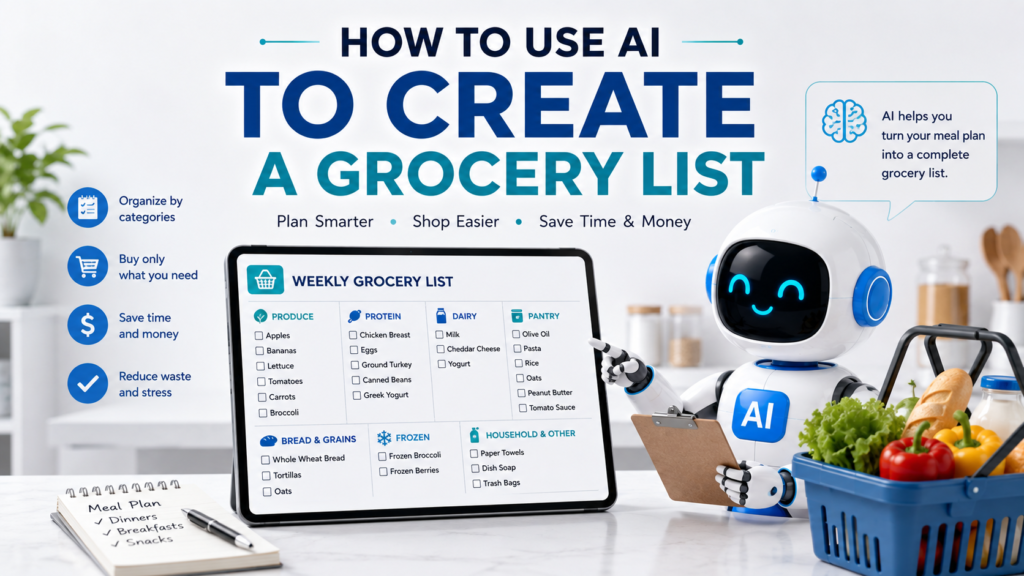
Creating a grocery list sounds simple until you try to remember everything you need for an entire week. You may have several meals planned, ingredients already sitting in your pantry, household staples running low, and items that need to fit within a budget.
One practical solution is to use AI to create a grocery list. Instead of manually checking every recipe and writing down each ingredient, you can give an AI assistant your meal plan, the foods you already have, and your shopping preferences. AI can then help turn that information into an organized list that is easier to review and use at the store.
The goal is not to let AI decide what you should buy. It is to use AI as an organizing assistant so you can spend less time building the list and reduce the chance of forgetting something important.
Here is a simple step-by-step approach.
Why Use AI to Create a Grocery List?
A grocery list often begins with information scattered across several places.
You may have:
- A weekly meal plan
- Several recipes
- Ingredients already in your refrigerator
- Pantry staples
- Household items you need to replace
- Snacks and breakfast foods
- A shopping budget
AI can help bring those pieces together.
For example, if your weekly meal plan includes chicken tacos, pasta with vegetables, rice bowls, and bean soup, AI can identify common ingredients and organize them into one list.
This works especially well after you have already decided what you want to eat. If you have not created your weekly menu yet, How to Use AI to Plan Meals for the Week explains how to build the meal plan first.
The basic process is simple:
Plan your meals → identify the ingredients → check what you already have → create the final grocery list.
USDA MyPlate recommends a similar approach: start with the ingredients needed for your planned meals and remove items you already have before shopping.
Step 1: Start With Your Meal Plan
The easiest way to create a useful grocery list is to start with the meals you actually plan to make.
For example:
Monday: Chicken and rice bowls
Tuesday: Chicken tacos
Wednesday: Pasta with vegetables
Thursday: Leftovers
Friday: Bean soup
Saturday: Homemade pizza
Sunday: Eggs, roasted potatoes, and vegetables
Then tell AI:
These are my planned dinners for the week. Identify the ingredients I may need for each meal. Do not create the final grocery list yet.
Why not ask for everything at once?
Breaking the process into smaller steps makes it easier to catch mistakes before they reach your final shopping list.
Step 2: Include Recipes When Exact Ingredients Matter
Meal names alone may not provide enough information.
“Chicken tacos” could mean many different things. One person might use tortillas, chicken, lettuce, tomato, cheese, and salsa. Another might use completely different ingredients.
If you already have recipes, give AI the relevant ingredient lists.
For example:
My chicken taco recipe uses chicken breasts, tortillas, lettuce, tomatoes, shredded cheese, salsa, and onions. My pasta recipe uses pasta, broccoli, onions, garlic, olive oil, and Parmesan.
Then ask:
Combine the ingredients required for these recipes and remove obvious duplicates.
This gives AI more reliable information than asking it to guess what your recipes contain.
Step 3: Tell AI What You Already Have
This is one of the most important steps.
Before creating your final list, check your refrigerator, freezer, and pantry.
You might find:
- Rice
- Pasta
- Olive oil
- Two onions
- Frozen broccoli
- Eggs
- Canned beans
- Spices
Give that information to AI:
I already have rice, pasta, olive oil, two onions, frozen broccoli, eggs, canned beans, salt, pepper, and common spices. Remove those items from the grocery list unless the planned meals require more than I currently have.
USDA MyPlate recommends checking your refrigerator, freezer, and pantry before shopping so you can plan around foods already on hand.
This step can help prevent unnecessary purchases.
Step 4: Ask AI to Combine Duplicate Ingredients
Several meals may use the same ingredient.
For example:
Monday needs one onion.
Wednesday needs one onion.
Friday needs two onions.
Your final grocery list should not contain “onion” three separate times.
Ask AI:
Combine duplicate ingredients into one grocery-list item. When quantities are available, calculate the total amount needed.
AI might turn several recipe entries into:
Onions — 4
This can make the list much easier to use.
However, check the totals yourself when quantities matter. AI can make arithmetic or interpretation mistakes, especially when recipes use different units.
Step 5: Ask for Reasonable Quantities
A list that says “chicken, tomatoes, cheese” may still leave you guessing at the store.
If your recipes include quantities, ask AI to combine them.
For example:
Four recipes use chicken. Combine the quantities and tell me the total amount needed for the week.
If exact quantities are not available, do not ask AI to pretend that it knows them.
Instead, try:
If you cannot determine a quantity from the information I provided, mark the item “quantity to confirm” instead of guessing.
That simple instruction can make the list more trustworthy.
Weak Prompt vs. Better Prompt
Weak Prompt
Make me a grocery list.
AI does not know what you plan to eat, what you already have, how many people you are feeding, or what you actually need.
It may produce a generic shopping list filled with items that are irrelevant to you.
Better Prompt
Create a grocery list from my seven-day meal plan for two adults. I already have rice, pasta, olive oil, eggs, frozen broccoli, onions, salt, pepper, and common spices. Remove items I already have when possible, combine duplicate ingredients, and organize the final list by grocery-store category. Do not add unrelated foods. If a quantity cannot be determined from the information I provide, mark it “quantity to confirm.”
The second prompt gives AI a clear task, useful context, and specific boundaries.
OpenAI recommends clear, specific prompts with enough context and suggests refining an initial response through follow-up prompts when necessary.
Step 6: Organize the List by Grocery Store Category
A random grocery list can make you walk back and forth across the store.
Ask AI to group items into categories.
For example:
Produce
- Apples
- Bananas
- Lettuce
- Tomatoes
- Carrots
Protein
- Chicken
- Ground turkey
- Beans
Dairy
- Milk
- Yogurt
- Cheese
Grains and Bread
- Tortillas
- Bread
- Oats
Frozen Foods
- Frozen vegetables
- Frozen fruit
Pantry
- Tomato sauce
- Canned beans
- Peanut butter
USDA MyPlate provides grocery-list resources organized into categories such as fruits, vegetables, grains, dairy, protein foods, and other items. It also suggests organizing a shopping list by category or store section.
You do not have to use those exact categories. Choose categories that match the store where you normally shop.
Step 7: Organize the List by Store Aisle
If you know your grocery store well, you can go one step further.
For example:
My store begins with produce, followed by bakery, meat, dairy, frozen foods, canned goods, and household products. Reorganize my grocery list in that order.
Now your list follows the path you normally take through the store.
USDA MyPlate notes that organizing a shopping list by food groups or aisles can help save time when you are familiar with your store’s layout.
You can save this ordering preference and reuse it when creating future lists.
Step 8: Add Breakfasts, Lunches, and Snacks
Dinner ingredients are only part of many grocery trips.
Once your dinner list is complete, add the other foods you actually need.
For example:
Add the ingredients needed for these breakfasts and lunches:
Breakfast: oatmeal with fruit, eggs and toast, yogurt with fruit
Lunch: leftovers, sandwiches, salads
Snacks: apples, yogurt, carrots
Then tell AI:
Add only the ingredients required for these foods. Combine duplicates with the existing grocery list.
This keeps the list tied to your actual plan rather than letting AI invent random extras.
Step 9: Add Household Staples Separately
Some grocery purchases are not connected to your meal plan.
You may need:
- Coffee
- Milk
- Paper towels
- Dish soap
- Trash bags
- Pet food
Keep these separate from recipe ingredients.
For example:
Add a section called “Household and Other Items” containing coffee, dish soap, trash bags, and paper towels. Do not change the food sections.
This keeps the list organized without mixing unrelated items.
Step 10: Ask AI to Find Possible Unnecessary Purchases
Once your list is complete, ask AI to review it.
Try:
Review this grocery list against my meal plan and the foods I already have. Identify anything that appears unnecessary or duplicated. Do not remove anything automatically.
The final sentence is important.
You want AI to point out possible problems, not silently decide what you no longer need.
You can then make the final choice yourself.
Step 11: Use AI to Adjust the List for Your Budget
If your grocery list looks expensive, AI can help you brainstorm ways to simplify it.
For example:
Review this grocery list and identify ingredients that are used for only one meal. Suggest whether any could be replaced with ingredients already used elsewhere in the week. Keep the meals reasonably similar.
Or:
Suggest lower-cost alternatives for the most expensive ingredients, but do not change anything until I approve the substitutions.
AI may suggest useful ideas, but it usually does not know the exact current prices at your local store.
Check real prices before making budget decisions.
Step 12: Avoid Buying an Ingredient for Only One Meal
One easy way to simplify grocery shopping is to reuse ingredients.
Suppose your meal plan requires fresh parsley for only one recipe.
You could ask:
This ingredient is used only once. Can I replace it with something already on my list without significantly changing the meal?
Or perhaps several meals can use the same vegetable, grain, or protein.
USDA MyPlate recommends considering ingredients that can be used in multiple recipes, which can help reduce waste and save money.
This can make both your meal plan and grocery list more efficient.
Step 13: Ask AI to Create a Final Shopping Version
Once you have reviewed the ingredients, quantities, categories, and possible duplicates, ask for a clean final version.
For example:
Create the final grocery list. Organize it by store category. Include only the items I need to buy. Remove explanations, recipe names, and planning notes. Keep quantities where they are known.
The result should be something you can actually use while shopping.
You might get:
Produce
- Apples — 6
- Bananas — 5
- Lettuce — 1 head
- Tomatoes — 5
- Carrots — 1 bag
Protein
- Chicken breasts — 2 lb
- Ground turkey — 1 lb
Dairy
- Milk — 1 gallon
- Greek yogurt — 1 container
- Shredded cheese — 1 bag
Bread and Grains
- Tortillas — 1 package
- Whole-wheat bread — 1 loaf
That is much easier to use than a long paragraph of shopping suggestions.
A Reusable AI Grocery List Prompt
You can reuse this template each week:
Help me create a grocery list from my weekly meal plan.
Number of people:
[Number]Meal plan:
[Paste your meals]Recipe ingredients:
[Paste ingredients when available]Foods I already have:
[List refrigerator, freezer, and pantry items]Other items I need:
[Breakfast foods, snacks, household items, etc.]Create a grocery list using only the information I provide. Combine duplicate ingredients and quantities when possible. Remove items I already have unless I need more. Organize the final list by grocery-store category. If a quantity cannot be determined, mark it “quantity to confirm” instead of guessing. Do not add unrelated items.
You can change the prompt depending on how much information you have.
Practical Example: From Meal Plan to Grocery List
Imagine your dinners are:
Monday: Chicken rice bowls
Tuesday: Chicken tacos
Wednesday: Pasta with broccoli
Thursday: Leftovers
Friday: Bean and vegetable soup
You already have:
Rice, pasta, canned beans, olive oil, frozen broccoli, salt, pepper, and spices.
Your first prompt could be:
Here is my five-day dinner plan and the ingredients I already have. Identify the additional ingredients I may need. Do not create the final list yet, and do not assume ingredients that are not obvious from the meal names without telling me.
After reviewing the result, provide recipe details where necessary.
Then say:
Remove the foods I already have and combine duplicate ingredients.
Finally:
Organize the remaining items into Produce, Protein, Dairy, Bread and Grains, Pantry, Frozen, and Other. Give me only the final shopping list.
This multi-step process gives you several opportunities to catch errors.
It is usually more reliable than asking AI to create the perfect list from one vague sentence.
Common Mistakes When Using AI for Grocery Lists
Asking AI to Invent the Entire List
If you ask AI to “make a grocery list” without providing a meal plan or preferences, it may add many foods you do not need.
Start with your real meals and requirements.
Forgetting to Check What You Already Have
You may end up buying another bottle of olive oil or another bag of rice when you already have enough.
Check your kitchen first.
Letting AI Guess Recipe Ingredients
Different people prepare the same meal differently.
Provide recipes or ingredient lists when accuracy matters.
Trusting Quantities Without Checking
AI may misunderstand serving sizes, recipe quantities, or units.
Review totals before shopping.
Mixing Meal Planning With Grocery Planning
First decide what you plan to eat.
Then determine what you need to buy.
Keeping the two tasks separate makes both easier to revise.
Accepting Every AI Suggestion
Your grocery list should reflect your household, budget, preferences, and actual kitchen inventory.
AI is there to organize the information, not make every decision.
Be Careful With Dietary and Allergy Information
If someone in your household has a serious food allergy or a medically necessary dietary restriction, do not rely on an AI-generated grocery list as your only safety check.
AI can make mistakes, overlook ingredients, or misunderstand product information.
Check product labels and appropriate professional guidance when health or allergy safety is involved.
For ordinary shopping organization, AI can be very useful. For safety-critical food decisions, verification matters more than convenience.
Keep the Final List Simple
A grocery list should be easy to use while you are walking through the store.
The planning process may involve several prompts, recipes, calculations, and revisions.
The final version should not.
Ask AI to remove unnecessary explanations and give you only:
- Category
- Item
- Quantity, when known
That is usually enough.
If your list changes during the week, you can update it rather than starting over.
For example:
Remove Tuesday’s taco dinner from the meal plan and update only the grocery items affected by that change.
This is another reason follow-up prompts are useful. Instead of rebuilding everything, you can ask AI to modify only the part that changed.
Use AI as a Shopping Organizer
AI can help you:
- Extract ingredients from a meal plan
- Combine duplicate ingredients
- Remove foods you already have
- Organize items by category
- Reorder the list by store section
- Identify possible unnecessary purchases
- Adjust the list when your meals change
- Produce a clean shopping version
But you still make the important decisions.
You know what is actually in your kitchen, which brands you prefer, what your local store carries, what prices you are willing to pay, and which foods your household will use.
Treat the AI-generated list as an organized draft that you review before shopping.
Final Takeaway
Learning how to use AI to create a grocery list can turn a repetitive planning task into a much simpler process.
Start with your meal plan. Give AI the relevant recipe ingredients, then tell it what you already have at home. Ask it to combine duplicate items, organize the remaining ingredients by grocery-store category, and keep quantities when they are known.
Review the result before you shop.
The best grocery list is not the longest or most detailed one. It is the list that contains what you actually need, removes what you already have, and is organized in a way that makes shopping easier.
Used this way, AI becomes a practical grocery-planning assistant rather than a tool that simply generates another generic shopping list.