
Introduction
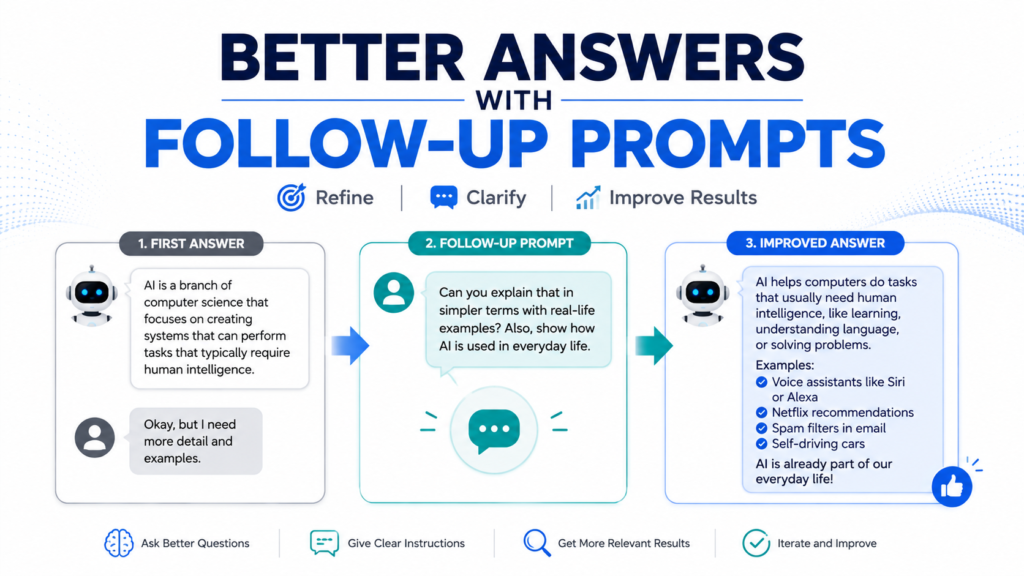
The first answer you get from AI does not have to be the final answer.
Learning how to use follow-up prompts to improve AI answers is one of the easiest ways for beginners to get more useful results. Instead of starting over whenever an answer is too long, too vague, too technical, or simply not what you wanted, you can tell AI exactly what should change.
A follow-up prompt is a simple instruction you give AI after it has already responded, allowing you to refine, clarify, or improve the previous answer.
You might ask AI to make an answer shorter, explain one part more clearly, provide examples, change the tone, compare alternatives, or correct something it misunderstood.
In this guide, you will learn how to use follow-up prompts to improve AI answers through practical examples you can use in everyday situations.
What Is a Follow-Up Prompt?
A follow-up prompt is a message that continues your existing conversation with AI.
Suppose you ask:
“Explain artificial intelligence to me.”
AI gives you an answer, but it feels too technical.
You do not need to write an entirely new prompt.
Simply respond:
“Explain that again using simpler language for someone who has never used AI.”
That second instruction is a follow-up prompt.
The AI can use the existing conversation as context, making it easier to refine the answer.
Why Follow-Up Prompts Improve AI Answers
Beginners sometimes believe they need to create the perfect prompt before pressing Send.
You usually do not.
AI works well as a conversation.
You can start with a reasonable question, review the response, and then improve it step by step.
This approach has several advantages:
- You do not need to predict everything in advance.
- You can identify exactly what is missing.
- You can refine only the parts that need improvement.
- You can explore several alternatives.
- You can make complicated tasks easier to manage.
Knowing how to get better answers from AI often means learning how to continue the conversation rather than trying to get everything perfect on the first attempt.
A Simple Follow-Up Prompt Example
Here is a simple example of how a follow-up prompt can improve an AI answer.
First prompt:
“Give me some ideas for saving money each month.”
AI gives a general answer.
Instead of starting over, you could follow up with:
“Keep the ideas that are realistic for beginners, remove anything that requires a major lifestyle change, and give me three actions I can start this week.”
The follow-up prompt tells AI what to keep, what to change, and what to make more specific. This is often more effective than repeating the original question.
1. Ask AI to Make the Answer Simpler
One of the most useful follow-up prompts is:
“Explain that more simply.”
You can make this even more specific.
For example:
“Explain that using everyday language and avoid technical terms.”
Or:
“Explain this as if I am completely new to the subject.”
This works well when learning about technology, finance, science, or other unfamiliar subjects.
Example
First prompt:
“What is machine learning?”
Follow-up prompt:
“Now explain it without technical terminology and give me one everyday example.”
The second prompt tells AI exactly how to improve the original response.
2. Ask for More Detail
Sometimes the first answer is too short.
Instead of asking the entire question again, identify the part you want expanded.
Try:
“Explain step 3 in more detail.”
“Give me more information about the second option.”
“Why is that important?”
“Walk me through that process step by step.”
Specific follow-up prompts usually work better than simply saying:
“Tell me more.”
3. Ask AI to Make the Answer Shorter
AI can also give you more information than you need.
If the response is too long, try:
“Reduce this to the five most important points.”
Or:
“Summarize this in 100 words.”
Or:
“Give me only the action steps.”
This is useful when AI provides a detailed explanation but you need something you can quickly read or use.
4. Ask for a Different Format
You may like the information but dislike how it is organized.
That is easy to change with a follow-up prompt.
For example:
“Turn this into a checklist.”
“Put these options into a comparison table.”
“Convert this into numbered steps.”
“Create a one-week schedule from this information.”
“Turn this into a shopping list grouped by category.”
The underlying information can stay similar while the presentation becomes much more practical.
5. Ask for a Real-World Example
When an AI explanation feels abstract, ask for an example.
Try:
“Give me a simple real-world example.”
Or:
“Show me what this would look like in everyday life.”
For example, after asking about a complicated financial concept, you might follow up with:
“Explain this using an example with $1,000 and simple numbers.”
Examples often make difficult ideas easier to understand.
6. Tell AI Exactly What You Did Not Like
One of the most effective ways to use follow-up prompts to improve AI answers is to explain what was wrong with the previous response.
Instead of:
“Try again.”
say:
“This answer is too technical. Keep the same information but rewrite it for a beginner.”
Instead of:
“I don’t like these ideas.”
say:
“These ideas are too expensive. Give me five alternatives under $50.”
Instead of:
“This email isn’t right.”
say:
“The email sounds too formal. Make it warmer and more conversational while keeping it professional.”
Specific feedback gives AI a clearer target.
7. Add Information You Forgot the First Time
Sometimes the AI answer is not useful because your original prompt was missing an important detail.
You can add it afterward.
For example:
First prompt:
“Create a dinner plan for this week.”
AI responds.
Then you realize you forgot something important:
“Revise the plan. I only have about 30 minutes to cook each evening.”
Or:
“Keep the same plan, but make all meals suitable for two people.”
You do not necessarily need to start over.
The follow-up instruction adds the missing context.
8. Add or Change Constraints
Your requirements may change after seeing the first answer.
Suppose AI recommends several vacation ideas.
You could follow up:
“Remove any destinations that require more than a four-hour flight.”
Or:
“Keep only options where the average hotel cost fits a $200-per-night budget.”
Constraints help narrow broad AI suggestions into something more useful.
If your initial answers are consistently too broad, learning how to give AI clear instructions can reduce the amount of correction needed later.
9. Ask AI to Compare Its Suggestions
AI may give you several reasonable options without making the differences clear.
Ask it to compare them.
For example:
“Compare options 2, 4, and 5 based on price, difficulty, and time required.”
Or:
“Create a table showing the advantages and disadvantages of each option.”
Then continue:
“Based on that comparison, which option best fits a beginner with a limited budget? Explain why.”
This turns a list of ideas into a decision-making process.
10. Ask for More Options
The first suggestions are not your only choices.
Try:
“Give me five more options, but make them different from the first list.”
Or:
“Give me three alternatives that cost less.”
Or:
“Suggest five options that are easier for beginners.”
This is particularly useful for brainstorming.
Instead of repeatedly asking the original question, tell AI how the new options should differ.
11. Ask AI to Identify What Is Missing
Sometimes you know an answer is incomplete but cannot identify why.
Ask AI to review it.
For example:
“What important information might be missing from this answer?”
Or:
“What questions should I ask before making this decision?”
Or:
“Review this plan and identify three potential problems I may have overlooked.”
AI’s review is not guaranteed to catch everything, but it can help you look at the problem from another angle.
12. Ask AI to Challenge Its Own Answer
You can also ask AI to present arguments against its previous recommendation.
Suppose AI recommends Option A.
Follow up with:
“Now make the strongest case against choosing Option A.”
Then:
“What circumstances would make Option B a better choice?”
This can be useful when comparing products, plans, strategies, or general ideas.
It helps prevent a conversation from staying focused on only one perspective.
13. Ask AI to Explain Its Assumptions
AI sometimes fills missing information with assumptions.
Make those assumptions visible.
Try:
“What assumptions did you make when creating this recommendation?”
Then review them.
If an assumption is wrong, correct it:
“I actually have a budget of $500, not $1,000. Revise the recommendation using that budget.”
This is often more efficient than restarting the entire conversation.
14. Ask AI to Check Whether It Followed Your Instructions
If your original prompt contained several requirements, ask AI to review its work against them.
For example:
“Check your answer against my original requirements. Tell me which requirements you followed and whether anything was missed.”
Then ask it to fix any omissions.
This can be particularly helpful with:
- Long documents
- Detailed plans
- Tables
- Structured writing
- Multi-step tasks
But remember that AI reviewing itself is not the same as independent verification.
15. Use Follow-Up Prompts to Improve Writing
Follow-up prompts are especially useful for writing.
Suppose AI drafts an email.
You might continue with:
“Make the opening friendlier.”
“Shorten the second paragraph.”
“Remove repeated ideas.”
“Make the request clearer.”
“Give me three alternative subject lines.”
“Keep the meaning but make the tone more professional.”
This allows you to edit a draft gradually instead of generating an entirely new version every time.
16. Use Follow-Up Prompts for Learning
AI can act like an interactive tutor when you continue asking questions.
For example:
“Explain photosynthesis in simple language.”
Then:
“Which part is most important for a beginner to remember?”
Then:
“Give me an everyday analogy.”
Then:
“Ask me five questions to test whether I understood it.”
Then:
“Explain why my answer to question 3 was incorrect.”
This creates an interactive learning experience that a single prompt cannot easily provide.
17. Ask for a Better Version, Not Just Another Version
There is an important difference between:
“Give me another answer.”
and:
“Improve the previous answer by making it shorter, more specific, and easier for a beginner to follow.”
The first prompt requests something different.
The second tells AI what “better” means.
Whenever possible, describe the improvement you want.
18. Do Not Assume the Improved Answer Is Correct
Follow-up prompts can make an answer clearer and more useful.
They do not automatically make it more accurate.
An incorrect statement can still be rewritten beautifully.
If factual accuracy matters, check if an AI answer is accurate using reliable independent sources.
You can also ask:
“Which factual claims in this answer should I verify?”
But do not rely solely on AI to verify itself.
19. Ask for Sources When You Need Evidence
If an AI answer contains important factual claims, a useful follow-up is:
“Provide reliable primary sources for the main claims in your answer.”
Then open those sources yourself.
Learning how to ask AI for reliable sources can make follow-up prompting much more useful for research.
However, AI can sometimes provide inaccurate or nonexistent citations, so always confirm that the source exists and supports the claim.
Google also recommends considering the source, author, publication date, and supporting evidence when evaluating online information. Its official guidance on evaluating information you find online provides useful principles for checking information beyond AI-generated answers.
20. Know When to Start a New Conversation
Follow-up prompts are useful, but continuing the same conversation forever is not always ideal.
Consider starting a new conversation when:
- You are changing to a completely different topic.
- Earlier instructions are interfering with the new task.
- The conversation has become confusing.
- You want to approach the problem from a fresh perspective.
For related work, continuing the conversation can preserve useful context.
For unrelated work, a fresh conversation may be clearer.
A Simple Follow-Up Prompt Formula
When an AI response is not quite right, use this simple structure:
Keep + Change + Add
For example:
“Keep the five recommendations, but make the explanations shorter and add an estimated cost for each one.”
Keep:
The five recommendations.
Change:
Shorter explanations.
Add:
Estimated costs.
Another example:
“Keep the friendly tone, but shorten the email to 120 words and add a clear request for a response by Friday.”
This formula makes follow-up instructions specific without making them complicated.
10 Follow-Up Prompts You Can Copy
Here are ten simple prompts you can reuse:
- “Explain this in simpler language.”
- “Give me a real-world example.”
- “Turn this into step-by-step instructions.”
- “Reduce this to the five most important points.”
- “Give me three different alternatives.”
- “What important information might be missing?”
- “What assumptions are you making?”
- “Compare these options in a table.”
- “Which claims in this answer should I verify?”
- “Keep the main idea, but make the answer more practical for a beginner.”
You can modify these prompts for almost any AI conversation.
Final Thoughts
You do not need to get the perfect AI response on your first attempt.
Learning how to use follow-up prompts to improve AI answers turns prompting into a conversation rather than a one-time command.
If an answer is too complicated, simplify it.
If it is too broad, narrow it.
If something is missing, add context.
If the format is inconvenient, change it.
If the information matters, verify it.
The best AI users are not necessarily the people who write the most complicated prompts. They are often the people who know how to review an answer, explain what needs improvement, and continue the conversation until the result becomes genuinely useful.