
Introduction
AI can be helpful, but it cannot guess exactly what you want.
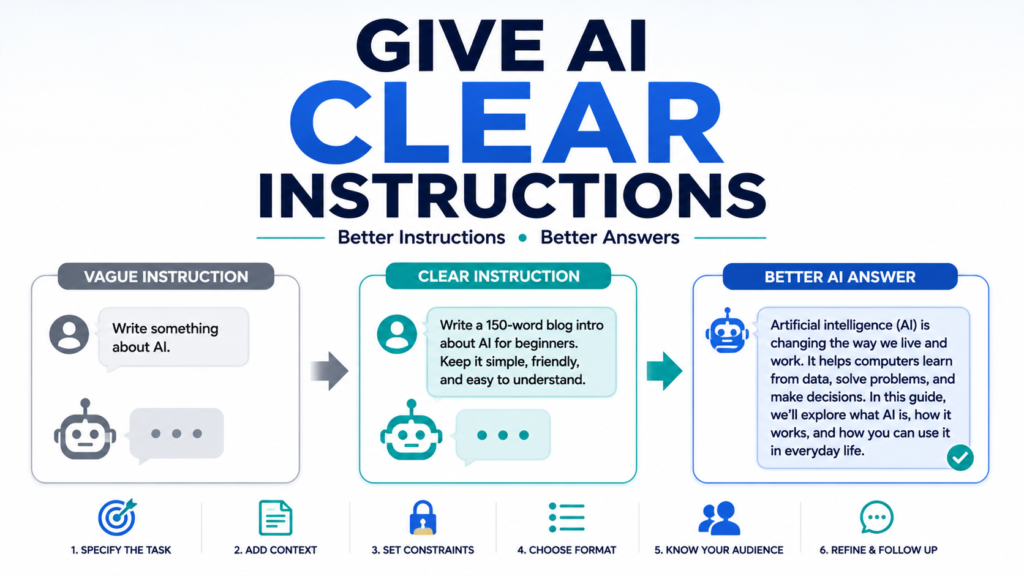
Learning how to give AI clear instructions can dramatically improve the answers you receive. When your instructions are vague, AI has to make assumptions. When your instructions clearly explain the task, context, requirements, and desired result, AI has a much better chance of producing something useful.
You do not need technical knowledge or complicated prompt formulas.
The goal is simply to communicate with AI as clearly as possible.
In this guide, you will learn practical ways to give AI better instructions, see examples of weak and improved prompts, and discover a simple structure you can use for everyday AI tasks.
Why Clear AI Instructions Matter
Imagine telling another person:
“Make this better.”
They would probably ask:
What should I improve?
Who is it for?
What is wrong with it?
How long should it be?
What tone should I use?
AI faces a similar problem.
It can generate an answer without those details, but it may not produce the answer you actually wanted.
Clear instructions reduce unnecessary guessing.
OpenAI also provides official guidance on prompt engineering best practices for giving AI clearer instructions.
They can help you get more relevant answers and spend less time correcting the results.
1. Start With the Specific Task
Begin by telling AI exactly what you want it to do.
Avoid starting with a broad request when you already know the specific task.
Weak prompt:
“Help me with this email.”
Better prompt:
“Rewrite this email so it sounds friendly and professional.”
The second prompt gives AI a clear action: rewrite.
Useful action words include:
- Explain
- Rewrite
- Summarize
- Compare
- Organize
- Brainstorm
- Translate
- Create
- Review
- Simplify
Starting with a clear action makes the rest of your instructions easier to understand.
2. Provide Relevant Context
After explaining the task, provide the information AI needs to understand the situation.
Suppose you ask:
“Create a meal plan.”
AI could produce thousands of different meal plans.
Instead:
“Create a five-day dinner plan for two adults who prefer simple home-cooked meals.”
Now AI knows more about what you need.
You could add:
“We have about 30 minutes to cook each evening.”
That additional context can make the answer even more useful.
The key is relevance.
Give AI the information that affects the answer rather than everything you know about the situation.
3. Add Clear Constraints
Constraints tell AI what boundaries it should follow.
For example:
“Give me vacation ideas.”
is extremely broad.
Compare it with:
“Give me five U.S. vacation ideas for a three-day weekend with a total hotel budget under $600.”
The second prompt gives AI boundaries.
Common constraints include:
- Budget
- Time
- Length
- Number of options
- Location
- Skill level
- Available materials
- Words to avoid
- Required information
Constraints can prevent AI from giving you answers that are technically relevant but impractical.
4. Specify the Desired Format
Tell AI how you want the answer presented.
For example:
“Explain what I should pack for a trip.”
could become:
“Create a packing checklist divided into clothing, toiletries, electronics, documents, and miscellaneous items.”
Other useful formats include:
- Numbered steps
- Bullet points
- Tables
- Checklists
- Short paragraphs
- Pros and cons
- Templates
- Schedules
If you plan to copy or use the answer somewhere else, telling AI the desired format can save significant editing time.
5. Tell AI Who the Answer Is For
Audience matters.
Compare:
“Explain machine learning.”
with:
“Explain machine learning to a beginner who has never studied computer science.”
The second instruction tells AI to adjust the vocabulary and complexity.
You can specify audiences such as:
“for a first-time user”
“for a customer”
“for a 10-year-old”
“for a small-business owner”
“for someone who speaks English as a second language”
This is particularly helpful when AI is writing something that another person will read.
6. Specify the Tone When Writing
When asking AI to write or rewrite something, explain how it should sound.
For example:
“Write an email asking for a refund.”
You could improve it:
“Write a polite but firm email asking for a refund. Keep the tone professional and avoid sounding angry.”
Useful tone descriptions include:
- Friendly
- Professional
- Conversational
- Warm
- Concise
- Persuasive
- Neutral
- Formal
Avoid giving conflicting instructions such as asking for something to be extremely formal and extremely casual at the same time.
7. Show AI an Example
Examples can be extremely useful when it is difficult to describe exactly what you want.
Suppose you want short product descriptions.
You might say:
“Write descriptions in this style:
‘A lightweight everyday backpack with a simple design and enough room for your daily essentials.’
Now write a similar description for this travel bag.”
The example demonstrates the approximate length, tone, and style you want.
You do not need an example for every prompt.
Use one when showing the desired result is easier than explaining it.
8. Separate Instructions From the Material
When giving AI a long passage to edit, make it clear which part contains your instructions and which part contains the material.
For example:
“Task: Rewrite the following message to sound professional. Keep it under 100 words.
Message:
[Paste message here]”
This structure reduces ambiguity.
For longer tasks, labels such as these can help:
Task:
Context:
Requirements:
Text:
Output:
You do not need to use this structure for simple questions, but it can be helpful for complicated prompts.
9. Tell AI What Not to Do
Sometimes exclusions are just as useful as instructions.
For example:
“Explain this in simple language. Do not use technical jargon.”
Or:
“Suggest five dinner ideas. Do not include seafood.”
Or:
“Rewrite this email professionally, but do not make it sound overly formal.”
This helps AI avoid results you already know you do not want.
However, do not overload a prompt with dozens of unnecessary restrictions.
Focus on the requirements that actually matter.
10. Give AI Enough Information—But Not Private Information
Better context often leads to better answers.
But that does not mean AI needs every personal detail.
Suppose you want help writing a letter about a billing dispute.
AI may need to understand:
- What happened
- What outcome you want
- The tone you prefer
It probably does not need your complete credit card number, Social Security number, password, or other sensitive information.
Use placeholders such as:
[Customer Name]
[Account Number]
[Company]
[Date]
Knowing how to protect your privacy when using AI helps you provide useful context without unnecessarily exposing personal information.
11. Break Large Instructions Into Steps
Complicated prompts sometimes contain too many tasks at once.
For example:
“Research vacation destinations, choose the best one, create an itinerary, estimate the budget, find restaurants, make a packing list, and write an email to my family.”
AI may attempt everything, but you may get better control by breaking the project into stages.
Start with:
“Compare three possible destinations based on cost, weather, and activities.”
After choosing one:
“Create a three-day itinerary for destination #2.”
Then continue from there.
Breaking complicated tasks into steps also makes it easier to notice mistakes before they affect the rest of the project.
12. Ask AI to Ask You Questions First
Sometimes you do not know what information AI needs.
In that case, make AI ask you.
For example:
“I want help creating a monthly household budget. Before creating it, ask me the questions you need answered.”
This can be particularly useful for:
- Planning
- Writing
- Travel
- Meal preparation
- Learning plans
- Project organization
Instead of guessing what context to provide, you let AI identify missing information.
13. Use Follow-Up Instructions
A good AI conversation rarely needs to end after one prompt.
If the first response is close but not quite right, tell AI what to change.
For example:
“Make it shorter.”
“Give me simpler examples.”
“Change the tone to sound friendlier.”
“Add estimated costs.”
“Remove options that require a subscription.”
“Explain step four in more detail.”
Learning how to get better answers from AI includes knowing how to refine an answer instead of starting over every time.
14. Avoid Instructions That Are Too Vague
Certain prompts often produce generic answers because they give AI almost no direction.
Examples include:
“Make this good.”
“Tell me everything.”
“Fix this.”
“Help me.”
“Give me the best one.”
Instead, explain what “good,” “fixed,” or “best” means for your situation.
For example:
Instead of:
“Make this better.”
Try:
“Rewrite this paragraph so a beginner can understand it. Keep the main meaning, shorten it to about 100 words, and use everyday language.”
Specific instructions give AI a clearer target.
15. Check Whether AI Followed Your Instructions
After AI responds, review the result.
Did it follow your requested format?
Did it stay within the budget?
Did it use the requested tone?
Did it answer the actual question?
Did it follow your exclusions?
If not, point out exactly what it missed.
For example:
“You included seven options, but I requested five. Please revise the answer to the five strongest options.”
AI responses should be reviewed rather than automatically accepted.
16. Clear Instructions Do Not Guarantee Correct Facts
Clear prompting can improve relevance and usefulness.
It cannot guarantee factual accuracy.
AI can still provide incorrect or outdated information even when your instructions are excellent.
For important factual information, check if an AI answer is accurate before relying on it.
This distinction is important:
Better instructions improve the quality of the request.
Verification improves confidence in the facts.
You need both when accuracy matters.
A Simple Instruction Formula
Beginners do not need a complicated prompt framework.
Try this:
Task + Context + Requirements + Format
For example:
Task:
“Create a weekly dinner plan.”
Context:
“For two adults who want easy meals.”
Requirements:
“Keep each meal under 30 minutes and the total grocery budget around $80.”
Format:
“Use a seven-day table with the meal, main ingredients, and estimated preparation time.”
Combined:
“Create a weekly dinner plan for two adults who want easy meals. Keep each meal under 30 minutes and the total grocery budget around $80. Present it as a seven-day table with the meal, main ingredients, and estimated preparation time.”
That is a clear AI instruction.
It tells AI what to do, provides relevant context, defines important boundaries, and explains how the result should be presented.
Clear Instructions vs. Perfect Prompts
Do not worry about creating a “perfect” prompt.
You usually do not need one.
Start with a reasonably clear instruction.
Look at the response.
Then improve it through follow-up questions.
If you are new to prompting, learning how to write AI prompts can give you a strong foundation, but everyday AI use should not feel like programming.
Clear communication matters more than complicated terminology.
Final Thoughts
Learning how to give AI clear instructions is one of the simplest ways to make AI more useful.
Tell AI exactly what task you want completed.
Provide relevant context.
Add important constraints.
Specify the audience, tone, or format when necessary.
Then review the response and refine your instructions if needed.
The goal is not to write the longest possible prompt.
It is to give AI enough direction to understand what a useful answer looks like.
Once you develop this habit, you will spend less time correcting irrelevant responses and more time getting practical value from AI.