
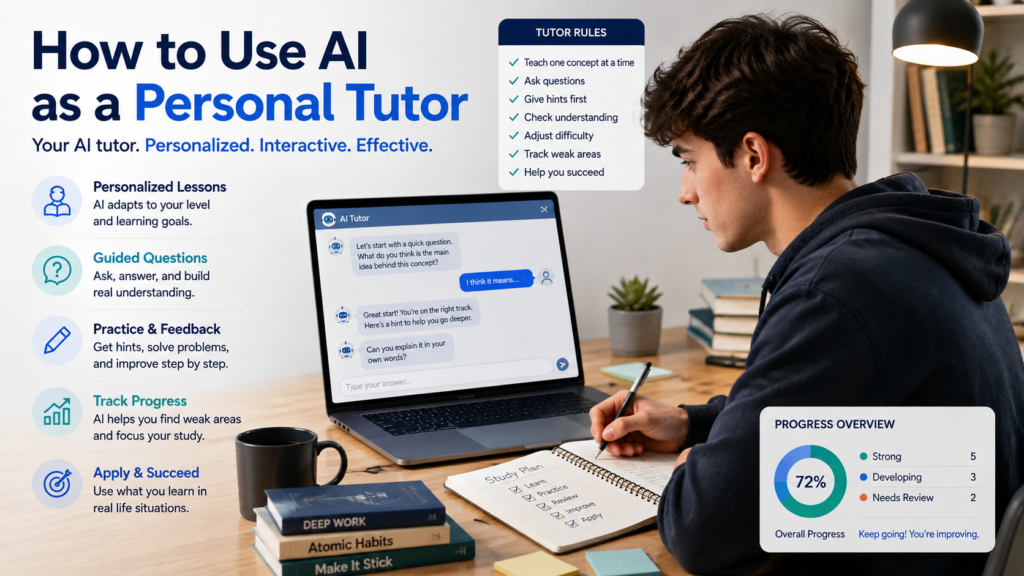
AI can answer questions in seconds, but a personal tutor should do more than give you answers.
A good tutor learns what you already understand, notices where you are struggling, explains difficult ideas in different ways, asks questions, gives hints, adjusts the difficulty, and helps you practice until you can solve problems on your own.
You can ask AI to work in much the same way.
Learning how to use AI as a personal tutor can turn an ordinary chatbot conversation into a more interactive learning experience. Instead of repeatedly asking, “What is the answer?” you can create a tutoring process where AI teaches one concept at a time, checks your understanding, gives feedback, and builds future lessons around the areas you need to improve.
The key is to tell AI how you want to be taught, not just what you want to know.
AI Answer Tool vs. AI Personal Tutor
The difference begins with how you use it.
| AI as an Answer Tool | AI as a Personal Tutor |
|---|---|
| Gives an answer | Guides you toward an answer |
| Explains everything at once | Teaches one step at a time |
| Uses one explanation | Adjusts explanations when needed |
| Shows solutions immediately | Gives hints before solutions |
| Requires little participation | Asks you questions |
| Moves on quickly | Checks your understanding |
| Focuses on the output | Focuses on the learning process |
| Starts fresh with each question | Can use the current session to target weak areas |
OpenAI’s Study Mode follows many of these principles. It can ask guiding questions, explain concepts in layers, check understanding, create practice questions, and help learners reason through problems instead of only providing final answers.
You can use similar principles whenever you ask AI to tutor you.
Step 1: Tell AI to Act as a Tutor
Start by defining the role.
Instead of:
Teach me algebra.
give AI specific tutoring instructions.
Copy-and-Use Personal Tutor Prompt
Act as my personal tutor for [SUBJECT OR TOPIC].
My current level is [BEGINNER / INTERMEDIATE / ADVANCED].
My learning goal is [WHAT YOU WANT TO UNDERSTAND OR BE ABLE TO DO].
Follow these tutoring rules:
- Teach one concept at a time.
- Use clear language appropriate for my level.
- Ask me questions during the lesson.
- Do not immediately give me the final answer when I make a mistake.
- Give me a hint first and let me try again.
- Ask me to explain important concepts in my own words.
- Adjust the difficulty based on my answers.
- Point out specific weaknesses that I should review.
- Give me practice before moving to the next major concept.
- Do not pretend I understand something just because I say “yes.” Check my understanding with a question or example.
Before teaching me, ask a few short questions to determine what I already know. Ask one question at a time and wait for my response.
This single prompt creates a much better starting point than repeatedly telling AI what to do throughout the lesson.
Step 2: Let the Tutor Check Your Starting Level
A personal tutor needs to know where to begin.
If the lesson is too easy, you waste time.
If it assumes knowledge you do not have, you become confused.
Ask AI to perform a short diagnostic assessment before teaching.
Copy-and-Use Level Check
Before we begin, give me a short diagnostic assessment on [TOPIC].
Ask 5 questions, one at a time.
Start with basic concepts and gradually increase the difficulty.
Do not tell me whether I am a beginner or intermediate until I have answered all five questions.
Afterward, summarize:
- What I appear to understand
- What I partly understand
- What I do not understand yet
- Where you recommend beginning the lesson
The assessment does not need to be long.
Its purpose is simply to avoid teaching from the wrong starting point.
Step 3: Give Your Tutor a Specific Goal
“Teach me Spanish” is too broad.
“Help me learn enough conversational Spanish to order food and ask basic questions while traveling” gives the tutor a destination.
Compare:
Broad goal:
Learn Excel.
Better goal:
Learn enough Excel to organize a small dataset, sort and filter information, and use basic formulas.
Broad goal:
Learn photography.
Better goal:
Understand aperture, shutter speed, and ISO well enough to control exposure manually.
Your goal helps AI decide what deserves attention and what can wait.
If you are beginning an unfamiliar subject and need help defining the learning path itself, How to Use AI to Learn Something New explains how to break a new topic into manageable concepts and build a learning roadmap.
Step 4: Ask for a Short Learning Plan
Once AI understands your level and goal, ask for a plan.
Copy-and-Use Learning Plan Prompt
Based on my current level and learning goal, create a simple learning plan.
Divide it into 5–8 stages.
For each stage, show:
- Main concept
- Why I need it
- What I should be able to do before moving on
Keep the plan focused on my stated goal. Do not add advanced topics unless they are necessary.
Show me the complete roadmap, but teach only Stage 1 for now.
That final instruction is important.
You want to see where you are going without receiving an enormous lesson all at once.
Step 5: Teach One Concept at a Time
A personal tutor should control the pace.
Tell AI:
Teach me the first concept only. Give me a short explanation, one example, and then ask me one question. Wait for my answer before continuing.
This creates a simple cycle:
Explain → Example → Question → Response → Feedback
If you understand the concept, continue.
If not, stay there.
Do not measure progress by how many pages of AI-generated explanations you have read.
Measure it by what you can explain and do yourself.
Step 6: Control How AI Explains Difficult Ideas
When an explanation does not work, change the explanation—not necessarily the topic.
Instead of creating several separate prompt blocks, keep a compact set of instructions you can reuse:
Quick Tutor Commands
Simplify: Explain this in simpler language without removing the main idea.
Example: Give me one everyday example.
Analogy: Explain this using an analogy, then tell me where the analogy becomes inaccurate.
Slow Down: Break the explanation into smaller steps and give me only the first step.
Define: Define the technical terms before using them.
Compare: Compare this with [CONCEPT I ALREADY UNDERSTAND].
Different Approach: Explain the same idea in a different way because the previous explanation did not work for me.
Save these commands.
You can use them during almost any tutoring session.
Step 7: Make AI Ask You Questions
A tutoring conversation should not consist of AI talking while you read.
Tell your tutor:
After each important concept, ask me a question that requires me to explain or apply the idea. Avoid questions that I can answer with only yes or no.
Compare:
Weak check
Do you understand?
You answer:
Yes.
That proves almost nothing.
Better check
Explain in your own words why increasing shutter speed can make a photograph darker.
Now you must demonstrate understanding.
Open-ended questions expose gaps that a simple “yes” can hide.
Step 8: Ask for Hints Before Answers
This is one of the most useful tutor rules.
When you get stuck, do not immediately ask:
What’s the answer?
Instead use:
Hint Ladder
I am stuck. Do not give me the solution.
Give me Hint 1, a small clue that points me in the right direction.
If I am still stuck, give me Hint 2, which can be more specific.
Give me the complete solution only after I have tried again or explicitly ask for it.
This preserves the part of learning where you actually think through the problem.
Khan Academy describes its Khanmigo tutoring approach similarly: it uses guiding questions and scaffolding to support independent thinking rather than simply giving away the answer.
Step 9: Make AI Analyze Your Mistakes
A wrong answer is useful if you understand why it was wrong.
Suppose AI gives you a practice problem and you answer incorrectly.
Do not ask only for the correct answer.
Use:
Copy-and-Use Mistake Review
Analyze my answer without immediately replacing it.
Tell me:
- What part of my reasoning was correct
- The exact point where my reasoning went wrong
- Which concept I may be misunderstanding
- One hint that will help me correct the answer myself
Then let me try again.
This turns mistakes into diagnostic information.
If you keep making the same type of error, AI can use that pattern to suggest what you should review next.
Step 10: Make the Tutor Adjust Difficulty
A personal tutor should not keep giving you questions that are far too easy or impossibly difficult.
Use:
Start with a question appropriate for my current level. If I answer correctly and explain my reasoning well, make the next question slightly harder. If I struggle, keep the difficulty similar and help me understand the missing concept before increasing it.
You can create a simple progression:
| Your Performance | Tutor Response |
|---|---|
| Correct with strong explanation | Increase difficulty |
| Correct but uncertain | Similar question |
| Partially correct | Target the missing concept |
| Incorrect | Hint + retry |
| Repeated difficulty | Short review lesson |
This makes the tutoring session responsive rather than fixed.
Step 11: Ask AI to Make You Explain the Lesson
After studying a concept, reverse the roles.
You become the teacher.
Teach-It-Back Prompt
I am going to explain [CONCEPT] to you in my own words as if I were teaching a beginner.
Do not interrupt while I explain.
Afterward, evaluate my explanation for:
- Accuracy
- Missing ideas
- Unclear reasoning
- Incorrect assumptions
Ask me one follow-up question about the weakest part of my explanation.
This is much more revealing than asking AI to explain the concept again.
If you cannot explain an idea clearly, you may not understand it as well as you thought.
Step 12: Create Practice Without Showing the Answers
Once you understand the lesson, practice independently.
Copy-and-Use Practice Prompt
Create 6 practice questions about [TOPIC] based on what we studied today.
Include:
- 2 basic questions
- 2 intermediate questions
- 2 application questions
Do not show answers or hints yet.
Let me answer one question at a time. After each response, give feedback before moving to the next question.
You can modify the format for different subjects:
- Math problems
- Vocabulary questions
- Short-answer questions
- Scenarios
- Writing exercises
- Coding challenges
- Concept comparisons
- Practical decisions
The learner should still do the work.
Step 13: Ask the Tutor to Track Weak Areas During the Session
Your tutor can keep a simple record within the current conversation.
At the beginning, say:
During this tutoring session, keep a short list of concepts I struggle with. Do not interrupt every time to show me the list. Use it to choose review questions later.
At the end, ask:
Based only on my answers during this session, create a Learning Review with:
Strong: Concepts I demonstrated clearly
Developing: Concepts I partly understand
Needs Review: Concepts I repeatedly struggled with
Next Step: What I should study next
This creates useful feedback based on your actual responses rather than a generic study recommendation.
Step 14: Create a Personal Review Quiz
Once the tutor identifies weak areas, create a targeted review.
Do not request another general quiz.
Use:
Create a 10-question review quiz based mainly on the concepts I struggled with during this session.
Include a few questions on concepts I understood well so I also practice retrieval.
Do not show the answers until I complete the quiz.
Afterward:
Grade my answers and create a short review plan based only on the mistakes I made.
Now the next study session has a clear starting point.
Step 15: Ask for a 15-, 30-, or 60-Minute Tutoring Session
Sometimes you do not need a full learning plan.
You simply have a limited amount of time.
30-Minute Tutor Prompt
I have 30 minutes to study [TOPIC].
Act as my personal tutor and divide the session approximately into:
5 minutes: Check what I already know
10 minutes: Teach the most important concept
10 minutes: Guided practice
5 minutes: Review and next stepsAsk questions throughout the session and wait for my responses. Do not simply generate 30 minutes of material at once.
You can change 30 minutes to whatever time you have available.
This makes AI useful even for short study sessions.
Step 16: Use Your Own Study Materials
A personal tutor becomes more useful when it works with the material you actually need to learn.
Depending on the AI tool you use, you may be able to provide:
- Class notes
- A worksheet
- Slides
- A study guide
- A syllabus
- A textbook excerpt you are permitted to use
- Your own summary
- Practice problems
Then say:
Study-My-Material Prompt
Use the material I provided as the basis for this tutoring session.
First identify the major concepts covered in the material.
Then quiz me on them one at a time.
When I answer incorrectly, explain the relevant concept using the provided material before adding outside information.
Clearly tell me if you introduce information that is not contained in my material.
OpenAI’s Study Mode can work with uploaded course materials such as notes, worksheets, slides, syllabus materials, and images when uploads are available.
Step 17: Prepare for a Test Without Just Memorizing Answers
AI can help organize test preparation, but the goal should be retrieval and understanding.
Start with:
My test is on [DATE] and covers [TOPICS]. I have [AVAILABLE STUDY TIME].
Help me create a realistic review plan. Prioritize topics based on my weak areas and the material I need to know. Include practice and self-testing rather than only rereading.
During review, ask:
Quiz me without showing answers.
Then:
Give me a new question that tests the same concept in a different way.
This makes it harder to memorize the pattern of one question instead of understanding the underlying concept.
Step 18: Use AI to Practice a Skill, Not Just Learn Facts
Personal tutoring is not limited to academic subjects.
You can use the same structure for:
- Writing
- Languages
- Presentations
- Coding
- Interview practice
- Spreadsheet skills
- Photography concepts
- Communication
- Software skills
For example:
Act as my conversational English tutor. Ask me one everyday question at a time. After each answer, correct only mistakes that affect clarity or naturalness. Briefly explain the correction, then continue the conversation.
Or:
Act as my beginner Excel tutor. Give me one small task at a time. Do not tell me exactly which command to use unless I ask for a hint. Let me explain how I would solve it first.
The tutoring principles remain the same:
Attempt → Feedback → Correction → Practice → Progress
Step 19: Verify Factual Information From Your AI Tutor
A tutor-like conversation can feel trustworthy because AI responds confidently and remembers the context of the lesson.
That does not guarantee that every explanation is correct.
OpenAI explicitly notes that Study Mode can make mistakes and recommends double-checking important information, particularly in high-stakes areas. Khan Academy likewise advises users to verify detailed factual information produced by AI tutoring systems.
For important information, ask:
Identify the factual claims from today’s lesson that would be most important to verify with authoritative sources. Do not simply tell me that everything should be verified.
Then check the important claims yourself.
How to Check If an AI Answer Is Accurate provides a more complete process for verifying AI-generated information before relying on it.
Step 20: End Every Tutoring Session With a Review
Do not simply close the chat when you run out of time.
Spend a minute reviewing what happened.
End-of-Session Prompt
End today’s tutoring session with a short Learning Review based only on what happened in this conversation.
Include:
Today I Learned: 3–5 concepts we covered
I Demonstrated Well: What my answers showed I understand
Needs More Practice: Areas where I struggled or needed hints
Next Session: The best place to continue
Quick Review: Three questions I should be able to answer next timeDo not exaggerate my progress. Base the assessment on my actual responses.
Save the review if you plan to continue later.
It gives you a practical starting point for the next session.
The Complete Copy-and-Use AI Personal Tutor Prompt
If you want one template rather than using the individual prompts above, copy this version.
Act as my personal AI tutor.
Subject: [SUBJECT]
Topic: [TOPIC]
Current level: [LEVEL]
Learning goal: [GOAL]
Available study time: [TIME]Before We Begin
Ask me up to five short diagnostic questions, one at a time, to understand what I already know.
After the diagnostic, briefly identify my starting level and create a focused learning roadmap.
Teaching Rules
- Teach one important concept at a time.
- Use language appropriate for my demonstrated level.
- Give examples when they improve understanding.
- Ask me an open-ended question after important concepts.
- Wait for my response before continuing.
- Do not give me the final answer immediately when I struggle.
- Give me a small hint first and allow me to try again.
- Ask me to explain major concepts in my own words.
- Gradually adjust difficulty based on my performance.
- Keep track of concepts I struggle with during this session.
When I Make a Mistake
Do not simply replace my answer.
Tell me what part of my reasoning was correct, identify where it went wrong, give me one useful hint, and let me try again.
Practice
After each major concept, give me at least one opportunity to apply it.
Do not show answers before I attempt the question.
Accuracy
Do not invent facts, sources, quotations, or statistics. Tell me when important factual information should be verified with an authoritative source.
End of Session
Give me a short review containing:
- What I learned
- What I demonstrated well
- What needs more practice
- Three review questions
- The recommended starting point for my next session
Begin by asking your first diagnostic question. Do not begin teaching until I answer.
This template is deliberately designed so that the first AI response should be a question to you, not a giant lesson.
A Simple Example: Learning Basic Photography
Imagine you paste the complete tutor prompt and enter:
Subject: Photography
Topic: Exposure triangle
Current level: Beginner
Learning goal: Understand how aperture, shutter speed, and ISO work together
Available study time: 30 minutes
Instead of receiving a long article about photography, the tutor might begin by checking what you already know.
After your diagnostic questions, the session could follow this path:
| Stage | Tutor Behavior | Your Job |
|---|---|---|
| Assess | Checks current knowledge | Answer honestly |
| Explain | Teaches one concept | Ask questions |
| Check | Asks you to explain | Recall the idea |
| Practice | Gives a problem | Try it yourself |
| Hint | Helps when stuck | Try again |
| Feedback | Analyzes your reasoning | Correct mistakes |
| Challenge | Raises difficulty | Apply knowledge |
| Review | Identifies weak areas | Plan next study |
That interaction is much closer to tutoring than asking AI a series of unrelated questions.
Common Mistakes When Using AI as a Personal Tutor
| Common Mistake | Better Approach |
|---|---|
| Asking only for answers | Ask for guided reasoning |
| Giving no information about your level | Start with a diagnostic |
| Learning too much at once | Teach one concept at a time |
| Saying “I understand” without testing it | Answer an application question |
| Requesting solutions immediately | Use hints first |
| Reading without participating | Explain concepts yourself |
| Practicing only easy questions | Gradually increase difficulty |
| Ignoring repeated mistakes | Track weak areas |
| Trusting every explanation | Verify important facts |
| Ending without reviewing | Create an end-of-session summary |
Use AI as a Tutor Without Giving Up Your Own Thinking
The most useful tutoring interaction is not:
You ask → AI answers → You read → Repeat
It is:
AI asks → You think → You answer → AI responds → You try again
That difference matters.
OpenAI’s Study Mode guidance describes this same general approach: the learning experience can use guiding questions, step-by-step explanations, knowledge checks, feedback, and personalized support to help users build understanding rather than simply receive a final answer.
A personal tutor should make you think more effectively—not eliminate the need to think.
Final Takeaway
Learning how to use AI as a personal tutor starts with changing the role you give AI.
Do not simply ask it to teach a subject.
Tell it how to teach you.
Give it your level and learning goal. Let it assess what you already understand. Ask it to teach one concept at a time, question you during the lesson, provide hints before answers, analyze mistakes, adjust difficulty, and track weak areas.
Most importantly, participate.
Try the problems yourself. Explain ideas in your own words. Ask questions when something is unclear. Correct your mistakes. Verify important factual information. End each session by identifying what you actually learned and what still needs practice.
AI can provide explanations almost instantly.
But when you configure it as a tutor, the most important answers should increasingly come from you.