
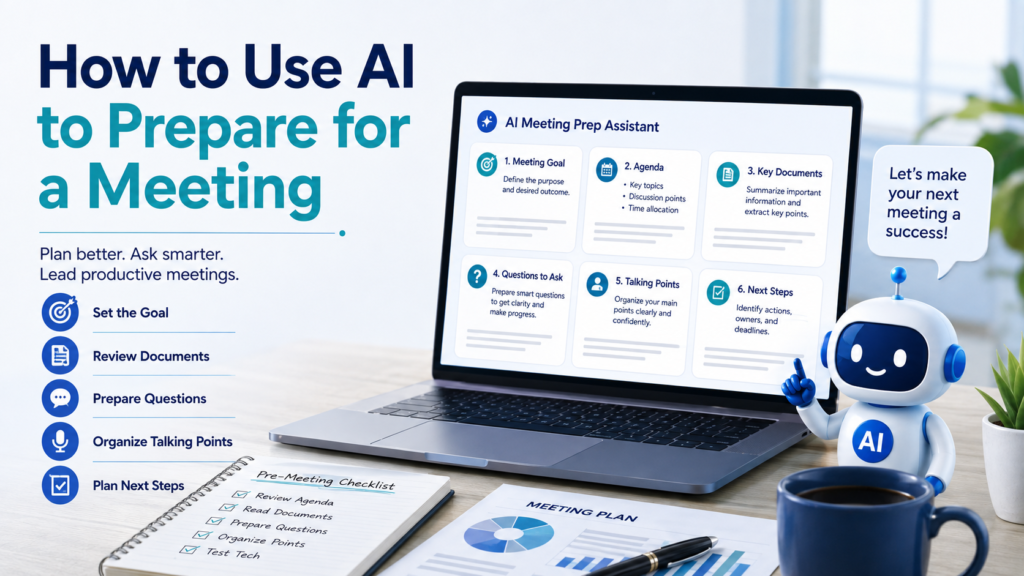
Preparing for a meeting can take almost as much time as the meeting itself. You may need to review background information, decide what needs to be discussed, organize questions, prepare talking points, and make sure you have the right documents ready.
When preparation is rushed, meetings can become unfocused. Important questions may be forgotten, participants may discuss issues without reaching a decision, and valuable time can be spent reviewing information that could have been understood beforehand.
Learning how to use AI to prepare for a meeting can make this process more organized. AI can help you define the meeting goal, build an agenda, summarize background material, develop useful questions, organize talking points, anticipate possible questions, and create a final preparation checklist.
The goal is not to let AI run the meeting for you. It is to arrive prepared with a clearer understanding of what needs to happen.
Why Use AI to Prepare for a Meeting?
Good meeting preparation usually involves several different tasks.
| Meeting Need | How AI Can Help |
|---|---|
| Unclear purpose | Clarify the desired outcome |
| Too much background information | Identify what needs review |
| No agenda | Organize discussion topics |
| Long documents | Extract relevant points |
| Unsure what to ask | Develop useful questions |
| Presenting an idea | Structure talking points |
| Expecting questions | Create practice questions |
| Final preparation | Build a pre-meeting checklist |
AI is especially useful for organizing information you already have.
Instead of asking AI to invent what a meeting should accomplish, start with the actual purpose, participants, background information, and decisions that matter.
Step 1: Define the Meeting Goal
Before creating an agenda, determine why the meeting is happening.
A vague goal might be:
Discuss the website.
That does not tell you what success looks like.
A clearer goal might be:
Review the proposed website changes and decide which updates should be completed before the September launch.
Now you have an outcome.
You can ask AI:
Sample Prompt:
I have a meeting about [topic]. The current situation is [context], and I think the goal is [goal]. Rewrite the meeting objective as one clear sentence focused on the outcome we should achieve. Do not add goals I did not mention.
A clear objective makes every other part of meeting preparation easier.
Step 2: Identify What You Need to Know Before the Meeting
Once the goal is clear, ask what information you need in order to participate effectively.
Suppose you are meeting to discuss a project delay.
You might need:
- Current project status
- Original deadline
- Reason for the delay
- Tasks that remain unfinished
- Available alternatives
- Budget implications
- Decisions that need to be made
Ask AI:
Based on this meeting objective, create a short list of information I should review before the meeting. Separate essential information from information that would simply be helpful.
This prevents preparation from turning into hours of unnecessary research.
Step 3: Review Previous Notes
Previous meeting notes can provide valuable context.
Instead of rereading several pages, give AI the notes and ask:
Review these previous meeting notes and identify:
- Decisions already made
- Unfinished action items
- Open questions
- Deadlines
- Topics that may need follow-up in the next meeting
Use only information in the notes and do not assume that an unfinished task has been completed.
If your notes are disorganized, How to Use AI to Take Better Notes can help you separate key information, questions, decisions, and action items before using them for meeting preparation.
Step 4: Summarize Background Documents
Meetings often include reports, proposals, presentations, or other documents that participants are expected to review beforehand.
AI can help you identify the relevant information.
Sample Prompt:
I am preparing for a meeting about [topic]. Summarize this document specifically for that meeting. Identify the key points, important numbers, decisions that may be required, and questions I should consider. Tell me which sections of the original document I should read carefully.
This is better than simply asking:
Summarize this document.
Your meeting purpose tells AI what information deserves attention.
For a more complete process, How to Use AI to Summarize Documents explains how to extract key points, action items, important details, and sections that require verification.
Step 5: Create a Focused Meeting Agenda
Once you know the goal and background, AI can help organize the agenda.
A useful agenda should connect discussion topics to the desired outcome.
For example:
| Agenda Item | Purpose | Suggested Time |
|---|---|---|
| Current status | Establish shared understanding | 5 min |
| Main problem | Clarify what needs resolution | 10 min |
| Possible options | Compare approaches | 10 min |
| Decision | Agree on direction | 10 min |
| Next steps | Assign actions and deadlines | 5 min |
Ask:
Create a 40-minute meeting agenda based on this objective and background information. Prioritize topics that require discussion or decisions. Include time for next steps at the end.
Do not assume AI’s time estimates are automatically realistic. Adjust them based on the complexity of the discussion and the people involved.
Atlassian’s guidance on meeting preparation similarly emphasizes identifying meeting outcomes and preparing an agenda before the meeting. Its agenda guidance recommends including objectives, discussion topics, relevant materials, and space for follow-up actions.
Step 6: Decide What Does Not Need Meeting Time
AI can also help you identify information that may not require discussion.
Suppose your agenda contains:
- Weekly sales numbers
- Website progress update
- Decision about launch date
- Review of completed tasks
- Discussion of budget increase
Some items may simply need to be shared beforehand.
Ask:
Review this proposed agenda. Identify items that could be handled by a written update instead of meeting discussion. Keep items that require questions, collaboration, problem-solving, or a decision.
This can make the meeting shorter and more focused.
AI should not make the final decision about what matters, but it can help you notice agenda items that may not require everyone’s time.
Step 7: Prepare Important Questions
Going into a meeting with useful questions can improve the discussion.
Rather than asking AI for generic questions, provide the context.
Sample Prompt:
I am attending a meeting about [topic]. The meeting goal is [goal]. Based only on the information below, suggest five questions that would help clarify risks, responsibilities, deadlines, and next steps. Do not invent facts about the project.
You can also categorize the questions:
| Question Type | Example |
|---|---|
| Clarification | What exactly needs to change? |
| Evidence | What information supports this recommendation? |
| Responsibility | Who will own the next step? |
| Deadline | When does this need to be completed? |
| Risk | What could prevent this plan from working? |
You do not need to ask every question AI suggests.
Choose the ones that genuinely help the meeting reach its goal.
Step 8: Organize Your Talking Points
If you need to explain an idea, give an update, or make a recommendation, AI can help structure what you want to say.
Suppose your rough notes are:
Project behind schedule, vendor late, design finished, testing needs another week, maybe launch following Monday.
Ask:
Turn these notes into concise talking points for a project update. Organize them as Current Status, Main Problem, Impact, Proposed Next Step, and Decision Needed. Do not add information that is not in my notes.
The result gives you structure without requiring you to memorize a script.
This is an important distinction.
For most meetings, talking points are more useful than a word-for-word AI-generated speech because they allow you to respond naturally to the conversation.
Step 9: Practice Explaining a Complicated Idea
If you expect to explain something difficult, ask AI to help make your explanation clearer.
For example:
I need to explain the following proposal to people who are not familiar with the technical details. Help me create a simple 60-second explanation. Preserve the important facts but remove unnecessary jargon.
Then test yourself:
Ask me three questions someone unfamiliar with this proposal might ask after hearing that explanation.
This can reveal parts of your explanation that still need work.
Step 10: Anticipate Questions Without Pretending to Know People
AI can help you prepare for possible questions, but there is a right and wrong way to do it.
Avoid requests such as:
Analyze my manager and tell me what she will ask.
AI does not reliably know what a particular person will think.
Instead, base the preparation on roles and subject matter:
I am presenting a proposal that affects cost, schedule, and staffing. Generate likely questions that someone responsible for budget, operations, or implementation might reasonably ask. Do not claim that any specific person will ask them.
You might receive questions such as:
- What will this cost?
- What happens if the schedule slips?
- Who will be responsible for implementation?
- What alternatives were considered?
- How will success be measured?
These are practice questions—not predictions.
Step 11: Practice Difficult Questions
Once you have possible questions, use AI as a practice partner.
Sample Prompt:
Ask me one challenging question at a time about this proposal. After I answer, tell me whether my response was clear, whether I avoided the question, and what important information may still be missing. Do not invent facts for me.
This can be especially useful before:
- Project reviews
- Client meetings
- Presentations
- Budget discussions
- Interviews
- Proposal meetings
The purpose is not to memorize perfect answers.
It is to discover where your preparation is weak.
Step 12: Compare Options Before a Decision Meeting
Some meetings exist primarily to choose between alternatives.
In that situation, AI can help organize the comparison before the discussion.
For example:
We are comparing Option A and Option B using cost, implementation time, ease of use, maintenance, and risk. Organize the information I provide into a comparison table. Do not score or rank an option unless the evidence supports it.
You might create:
| Criterion | Option A | Option B | Needs Verification |
|---|---|---|---|
| Cost | $___ | $___ | Yes/No |
| Implementation | ___ | ___ | Yes/No |
| Ease of use | ___ | ___ | Yes/No |
| Maintenance | ___ | ___ | Yes/No |
| Risk | ___ | ___ | Yes/No |
This gives the meeting a common structure for discussion without asking AI to make the final decision.
Step 13: Identify Decisions That Need to Be Made
A meeting can cover many topics without producing a clear outcome.
Before the meeting, ask:
Based on this agenda, identify the specific decisions that may need to be made. Phrase each one as a question that can be answered during the meeting.
For example:
Instead of:
Launch date
use:
Should we keep the current launch date or move it by one week?
Instead of:
Marketing budget
use:
Should the additional marketing budget be approved?
Clear decision questions make it easier to recognize whether the meeting actually accomplished something.
Step 14: Prepare a Final Meeting Checklist
Before joining the meeting, use a short checklist.
| Final Check | Ready? |
|---|---|
| Meeting objective is clear | ☐ |
| Agenda reviewed | ☐ |
| Background documents reviewed | ☐ |
| Important questions prepared | ☐ |
| Talking points organized | ☐ |
| Decisions needed identified | ☐ |
| Relevant files ready | ☐ |
| Technology checked if needed | ☐ |
You can ask AI:
Based on everything we prepared for this meeting, create a final checklist containing only items I should verify before the meeting begins. Keep it short enough to review in two minutes.
If you regularly use preparation checklists, How to Use AI to Create Checklists provides a broader method for building clear and reusable lists.
Step 15: Create a Reusable Meeting-Preparation Template
If you attend similar meetings regularly, do not rebuild the preparation process every time.
Create a reusable template.
Meeting Goal
What should be accomplished?
Background
What changed since the last meeting?
Documents to Review
What information should I understand beforehand?
Questions
What needs clarification?
Talking Points
What do I need to communicate?
Decisions Needed
What needs agreement?
Next Steps
What should be captured before the meeting ends?
Then ask AI:
Turn this structure into a reusable meeting-preparation template. Keep the questions short and leave space for my answers.
The next time you prepare, fill in the template and ask AI to help organize it.
Step 16: Protect Confidential Meeting Information
Meeting preparation can involve sensitive material.
Before pasting information into an AI tool, check for:
- Customer information
- Employee information
- Financial data
- Confidential company plans
- Contracts
- Internal strategy
- Passwords or access credentials
- Private information about participants
AI usually does not need every identifying detail to help you prepare.
Instead of:
Prepare questions about Jane Smith’s confidential performance review…
you may be able to use:
Help me organize questions for a confidential employee-review meeting. Do not provide legal or HR conclusions.
Also follow your organization’s rules about which AI tools may be used with workplace information.
The Federal Trade Commission has warned that people and businesses may provide sensitive or confidential information to AI services, including internal documents and customer data, making the provider’s privacy and confidentiality practices important. FTC guidance on AI privacy and confidentiality provides useful background on this issue.
A Reusable AI Meeting-Preparation Prompt
For many meetings, you can use this template:
I am preparing for a meeting.
Topic:
[Topic]Meeting goal:
[Goal]Participants or roles:
[Roles if relevant]Background:
[Important context]Documents or notes:
[Paste relevant information]Help me prepare:
- A clear meeting objective
- A focused agenda
- Important information I should review
- Five useful questions
- My main talking points
- Decisions that may need to be made
- Possible questions I should be prepared to answer
- A short final preparation checklist
Use only the information I provide when discussing specific facts. Clearly identify anything that requires verification, and do not invent information about the participants.
This gives AI enough structure to help without giving it permission to fill gaps with assumptions.
Before and After: A Simple Example
Suppose your original preparation looks like this:
Meeting Thursday about website. Need talk about delay. Budget maybe issue. New images not ready. Ask about launch. Need status from design team.
That is enough information to start, but not enough structure to guide a productive meeting.
After AI organization, it might look like:
Meeting Objective
Determine whether the website launch date needs to change based on the current delay and unfinished work.
Information to Confirm
- Current design status
- Status of new images
- Effect of the delay on launch timing
- Whether there is a budget impact
Questions
- When will the new images be ready?
- Is any other work blocked by the images?
- Can the current launch date still be met?
- Does the delay create additional costs?
- What decision needs to be made Thursday?
Talking Points
- Current delay
- Unfinished images
- Possible schedule impact
- Possible budget concern
Decisions to Capture
- Final launch date
- Immediate next steps
- Responsibility for unfinished work
AI did not need to invent a new strategy.
It simply transformed rough preparation into something you can use.
Common Mistakes When Using AI to Prepare for a Meeting
| Common Mistake | Better Approach |
|---|---|
| Asking AI to prepare without context | Provide the meeting goal and background |
| Creating a long agenda | Prioritize discussion and decisions |
| Letting AI invent missing facts | Tell it to flag unknown information |
| Preparing a full script | Use flexible talking points |
| Predicting what specific people will think | Practice role- and topic-based questions |
| Reviewing every document equally | Focus on material relevant to the meeting |
| Ignoring sensitive information | Remove unnecessary confidential details |
| Preparing discussion but not decisions | Identify desired outcomes beforehand |
A polished preparation document does not guarantee a productive meeting. It should help you focus your attention on the right information and conversations.
Use AI to Prepare—Then Participate Yourself
AI can organize a great agenda and generate thoughtful questions, but it cannot replace what happens between people during a real meeting.
Listen carefully.
Ask follow-up questions.
Notice when new information changes the situation.
Be willing to adjust your position.
Clarify decisions before leaving.
And make sure important next steps have an owner and, when appropriate, a deadline.
Atlassian’s meeting guidance emphasizes clear objectives, structured agenda items, preparation materials, and action items as core parts of effective meeting planning. Atlassian’s meeting preparation guidance provides a useful additional reference for building this structure.
Final Takeaway
Learning how to use AI to prepare for a meeting can help you walk into a discussion with a clearer goal, better questions, organized talking points, and a stronger understanding of the information that matters.
Start with the meeting objective.
Review previous notes and relevant documents. Build an agenda around the decisions and discussions that actually require meeting time. Prepare questions, organize your talking points, and practice difficult questions when necessary.
Then create a short final checklist.
Most importantly, do not ask AI to invent facts about the meeting or predict what particular people will think. Use it to organize the information you actually have and identify what still needs clarification.
Good AI-assisted preparation should not make a meeting more complicated.
It should help you arrive knowing why you are there, what you need to discuss, what you need to learn, and what needs to happen next.