
Taking good notes sounds simple until you actually need to use them later. You may write down too much, miss important details, mix action items with general information, or end up with pages of notes that are difficult to review.
AI can help with this problem.
Learning how to use AI to take better notes does not mean letting AI replace your attention or thinking. Instead, AI can help you organize rough notes, identify key points, clarify confusing sections, create useful summaries, separate questions from action items, and turn scattered information into notes you can actually use.
Whether you are taking notes during a meeting, studying something new, researching a topic, or simply trying to organize everyday information, the right AI workflow can make your notes clearer and more useful.
Why Use AI to Take Better Notes?
The purpose of notes is not to record every word. Good notes should help you remember, understand, and use important information later.
Cornell University’s Learning Strategies Center makes a similar point: good notes are notes you can actually use, and different note-taking methods may work better for different situations.
AI can help at several stages:
| Note-Taking Problem | How AI Can Help |
|---|---|
| Notes are messy | Organize them into sections |
| Too much information | Identify key points |
| Important tasks are buried | Extract action items |
| Ideas are disconnected | Group related concepts |
| Notes are difficult to review | Create a concise summary |
| Something is unclear | Generate questions to investigate |
| Notes need structure | Convert them into a consistent format |
The key is to use AI as an assistant for improving your notes—not as an automatic replacement for understanding the information yourself.
Step 1: Capture the Important Information First
Before AI can improve your notes, you need something useful to work with.
Do not worry about making every sentence perfect while taking notes. Focus first on capturing important information.
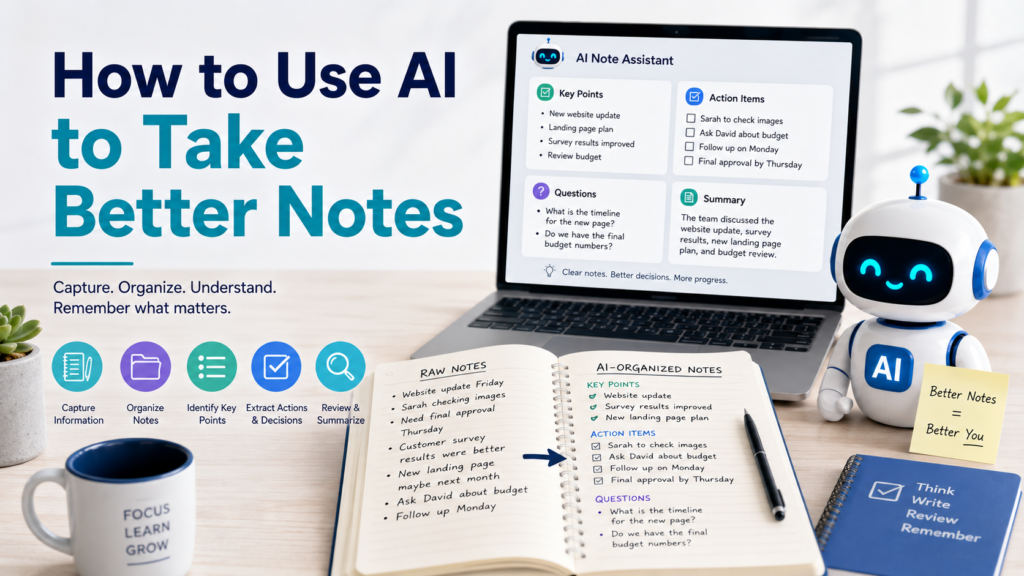
For example, rough meeting notes might look like this:
Website update Friday. Sarah checking images. Need final approval Thursday. Customer survey results were better. New landing page maybe next month. Ask David about budget. Follow up Monday.
These notes are messy, but they contain useful information.
Instead of rewriting everything manually, give the notes to AI.
Sample Prompt:
Organize these rough notes without adding new information. Separate them into Key Updates, Decisions, Questions, Action Items, and Deadlines.
This gives AI a clear job while reducing the chance that it will unnecessarily rewrite your ideas.
Step 2: Turn Messy Notes Into an Organized Structure
AI is especially useful when your notes contain useful information but lack structure.
Suppose you have:
Need better storage, office gets dark afternoon, maybe desk lamp, cables messy, chair uncomfortable, measure wall for shelves, check prices this weekend.
Ask:
Organize these notes into clear categories. Preserve every important detail and do not add recommendations unless I ask for them.
The result might become:
Workspace Organization
- Organize cables
- Measure wall for possible shelves
- Research storage options
Lighting
- Office becomes dark in the afternoon
- Consider a desk lamp
Furniture
- Current chair is uncomfortable
Next Steps
- Check prices this weekend
The information has not fundamentally changed. It is simply easier to understand.
If your starting material contains many disconnected thoughts, How to Use AI to Organize Your Ideas provides a useful method for grouping scattered information before deciding what to do with it.
Step 3: Ask AI to Identify the Key Points
Sometimes your notes contain too much information.
Instead of asking AI to shorten everything immediately, ask it to identify what matters most.
Sample Prompt:
Review these notes and identify the five most important points. Keep important names, dates, decisions, and numbers exactly as written. Put less important supporting details in a separate section.
This gives you both the main information and the supporting context.
You can also ask:
Which parts of these notes are essential for understanding the topic, and which parts are supporting details?
This can be useful for meetings, lectures, research, articles, and personal planning.
Step 4: Separate Facts, Questions, and Actions
One of the biggest problems with unstructured notes is that different types of information get mixed together.
For example:
Delivery expected Tuesday. Need to confirm address. Did supplier approve new price? Call Alex tomorrow. Packaging design looks good.
This contains several types of information.
| Type | Note |
|---|---|
| Fact | Delivery expected Tuesday |
| Action | Confirm address |
| Question | Did supplier approve new price? |
| Action | Call Alex tomorrow |
| Observation | Packaging design looks good |
AI can separate these automatically.
Sample Prompt:
Sort these notes into Facts, Questions, Decisions, and Action Items. Do not change the meaning or invent missing information.
This makes it much easier to see what requires your attention.
Step 5: Turn Notes Into Action Items
Notes are often useful because they tell you what needs to happen next.
But those tasks may be buried inside paragraphs.
Ask AI:
Review these notes and extract every action item. For each action, include the responsible person and deadline only if they are explicitly mentioned. Write “Not specified” if that information is missing.
For example:
| Action Item | Person | Deadline |
|---|---|---|
| Approve final images | Not specified | Thursday |
| Ask about budget | David | Not specified |
| Follow up | Not specified | Monday |
The phrase only if explicitly mentioned is important because you do not want AI inventing responsibilities or deadlines.
Once you have identified the tasks, How to Use AI to Make a To-Do List can help turn them into a manageable list with clearer priorities.
Step 6: Create a Short Summary for Future Review
Good notes should make it possible to understand what happened without rereading everything.
After organizing your notes, ask AI to create a short summary.
Sample Prompt:
Write a three-to-five sentence summary of these notes for future review. Include the main topic, most important conclusion, and any major next step. Do not add information that is not in my notes.
You can keep the full notes and place the summary at the top.
That gives you two levels of information:
Quick Review → Summary
Detailed Review → Full Notes
This is particularly useful when you accumulate many notes over time.
Step 7: Use AI for Meeting Notes
Meetings are a natural use case because notes often contain a mixture of discussion, decisions, questions, and follow-up tasks.
After a meeting, you might use:
Organize these meeting notes into:
- Main Topics
- Key Decisions
- Action Items
- Responsible People
- Deadlines
- Open Questions
Do not assign a person or deadline unless it appears in the original notes.
Then review the output against what actually happened.
Some AI meeting tools can also generate notes and tasks directly. For example, Microsoft documents that Copilot in Teams can generate notes and tasks during a meeting, including in certain configurations without recording or transcription. However, Microsoft also notes that organizational retention policies can affect how Copilot interactions are retained.
So convenience should not replace checking your workplace’s privacy, recording, and information-handling policies.
Step 8: Use AI to Improve Study Notes
AI can also help make study notes easier to review without replacing active learning.
Suppose your notes contain several pages about a topic.
Instead of asking:
Rewrite my notes.
try:
Organize these study notes into Key Concepts, Important Definitions, Examples, Questions I Should Be Able to Answer, and Topics I May Need to Review Again. Use only information contained in my notes.
You can then ask:
Create five review questions based only on these notes. Do not provide the answers until I ask.
This turns passive notes into material you can actively review.
Cornell University’s Learning Strategies Center describes note-taking as an active learning process and recommends reviewing, questioning, reflecting on, and summarizing notes rather than simply recording information and putting it away. Cornell’s note-taking strategies provide a useful framework for this kind of active review.
Step 9: Try a Cornell-Style AI Note Format
You do not have to use a formal note-taking system, but a structured method can help.
The Cornell Note-Taking System uses notes together with questions or cues, reflection, and review.
AI can help reorganize your existing notes into a similar study-friendly structure.
Sample Prompt:
Reorganize these notes into a Cornell-style format with:
- Main Notes
- Questions or Cue Words
- Short Summary
Use only information in my notes. If something is unclear, identify it as a question instead of guessing.
This can make notes more useful for later review.
The important part is still your own engagement with the material. AI can organize the information, but you should answer questions and explain concepts in your own words whenever possible.
Step 10: Create Notes at Different Levels of Detail
Not every situation needs the same level of detail.
You might need a 30-second review today and a detailed reference three months later.
Ask AI to create layers:
Organize these notes into three levels:
- One-sentence takeaway
- Five key points
- Detailed organized notes
Preserve important facts and do not add new information.
This gives you a fast way to review the same material at different depths.
| Review Need | Best Format |
|---|---|
| Quick reminder | One-sentence takeaway |
| Short review | Key points |
| Detailed reference | Full organized notes |
This structure works particularly well for research, meetings, learning, and project notes.
Step 11: Ask AI to Find Unclear Areas
Your notes may contain incomplete thoughts that made sense when you wrote them but become confusing later.
Instead of allowing AI to guess what they mean, ask it to flag them.
Sample Prompt:
Review these notes and identify statements that are incomplete, ambiguous, or missing context. Do not fill in the missing information. Turn each unclear point into a question I can verify.
For example:
New deadline changed.
might become:
What is the new deadline?
And:
Need approval from manager.
might become:
Which manager needs to approve this, and by when?
This turns incomplete notes into useful follow-up questions without creating false information.
Step 12: Compare Your Notes With the Original Source
AI can accidentally remove, change, or misinterpret details.
When accuracy matters, compare the organized version with the original.
Pay particular attention to:
- Names
- Dates
- Numbers
- Prices
- Deadlines
- Decisions
- Quotes
- Responsibilities
- Technical terminology
You can even ask AI to assist with the comparison:
Compare my original notes with this organized version. Identify any information that appears to have been removed, changed, or added. Do not rewrite anything yet.
But you should still make the final check yourself.
Step 13: Turn Notes Into a Checklist
Some notes eventually need to become something actionable.
For example, meeting notes may produce five follow-up tasks, or research notes may reveal several items that still need verification.
Instead of leaving those actions buried in your notes, turn them into a checklist.
Sample Prompt:
Extract only the tasks from these notes and create a checklist. Do not turn general information into tasks unless an action is clearly implied.
For a more complete method, How to Use AI to Create Checklists explains how to organize checklist items, prioritize them, identify possible gaps, and create reusable lists.
This creates a useful progression:
Notes → Key Information → Actions → Checklist
Step 14: Build a Reusable Notes Template
If you take the same type of notes repeatedly, create a template.
For meeting notes:
Create a reusable meeting-notes template with sections for Date, Participants, Main Topics, Decisions, Action Items, Deadlines, and Open Questions.
For learning:
Create a reusable study-notes template with sections for Main Concept, Key Details, Examples, Questions, Connections to Previous Knowledge, and Summary.
For personal projects:
Create a project-notes template with sections for Ideas, Decisions, Problems, Possible Solutions, Tasks, and Next Steps.
Once you find a structure that works, reuse it rather than rebuilding your note system every time.
Before and After: Turning Messy Notes Into Useful Notes
Consider these rough notes:
Kitchen project maybe next month. Need measure cabinets. Budget around 2k? Ask contractor about timeline. New lights would help. Maybe paint first. Sarah likes lighter cabinets. Need compare prices. Saturday measure room.
An AI-assisted version might become:
Project
Kitchen improvement project — possibly next month.
Budget
- Estimated budget mentioned: around $2,000
- Budget needs confirmation
Ideas
- Consider new lighting
- Consider painting first
- Preference mentioned for lighter cabinets
Questions
- What is the contractor’s expected timeline?
- What are the price differences between options?
Action Items
- ☐ Measure the room Saturday
- ☐ Measure cabinets
- ☐ Ask contractor about timeline
- ☐ Compare prices
Notice what AI did not need to do.
It did not need to design the kitchen, choose the cabinets, or decide how the money should be spent.
It simply made the existing notes more useful.
Protect Private Information in Your Notes
Notes can contain sensitive information without you realizing it.
Before pasting notes into an AI service, check whether they contain:
- Passwords
- Account numbers
- Private financial information
- Confidential workplace information
- Medical information
- Personal identification numbers
- Sensitive information about another person
Remove or generalize information that AI does not need.
For example, replace a real customer name with Customer A if the identity is irrelevant to the organization task.
Meeting recordings and transcripts deserve additional care because they may capture other people’s voices and information. Recording, consent, privacy, and workplace requirements can vary, so check the rules that apply before using an AI transcription or recording feature.
A Reusable Prompt for Better Notes
Here is a general template you can adapt:
Help me improve the following notes:
[Paste notes]
Please:
- Preserve the original meaning.
- Organize related information into clear sections.
- Identify the most important points.
- Separate facts, questions, decisions, and action items.
- Preserve names, dates, numbers, and deadlines exactly as written.
- Flag unclear information instead of guessing.
- Create a short summary at the top.
- Do not add facts that are not supported by my notes.
Keep the final notes concise and easy to review.
This works well as a starting point because it tells AI both what to do and what not to do.
Common Mistakes When Using AI for Notes
| Common Mistake | Better Approach |
|---|---|
| Asking AI to replace your attention | Capture important information yourself |
| Letting AI freely rewrite everything | Ask it to preserve meaning and facts |
| Trusting summaries without review | Compare important details with the original |
| Mixing facts and AI suggestions | Label suggestions separately |
| Keeping action items buried in notes | Extract them into a clear section |
| Including unnecessary private data | Remove or generalize sensitive details |
| Never reviewing notes again | Create summaries, questions, or checklists |
AI should make your notes more useful—not make you less engaged with the information.
Final Takeaway
Learning how to use AI to take better notes is not about asking AI to record everything for you.
The most useful approach is to capture important information, then use AI to organize it, identify key points, separate questions and action items, create summaries, and flag areas that need clarification.
For study notes, use AI to help create questions and structure your review while continuing to think through the material yourself. For meetings and projects, use AI to separate discussion from decisions and next steps.
And whenever accuracy matters, compare AI’s output with the original information.
Good notes should make information easier to understand and use. AI can help you get there faster—as long as you remain the person deciding what matters.